Free up to 500MB · No credit card · Setup in 60 seconds
Collect every photo & video from your wedding, party or event
One branded upload page and a printable QR code, your guests can use straight from their phone. No app, no account, no missing memories.
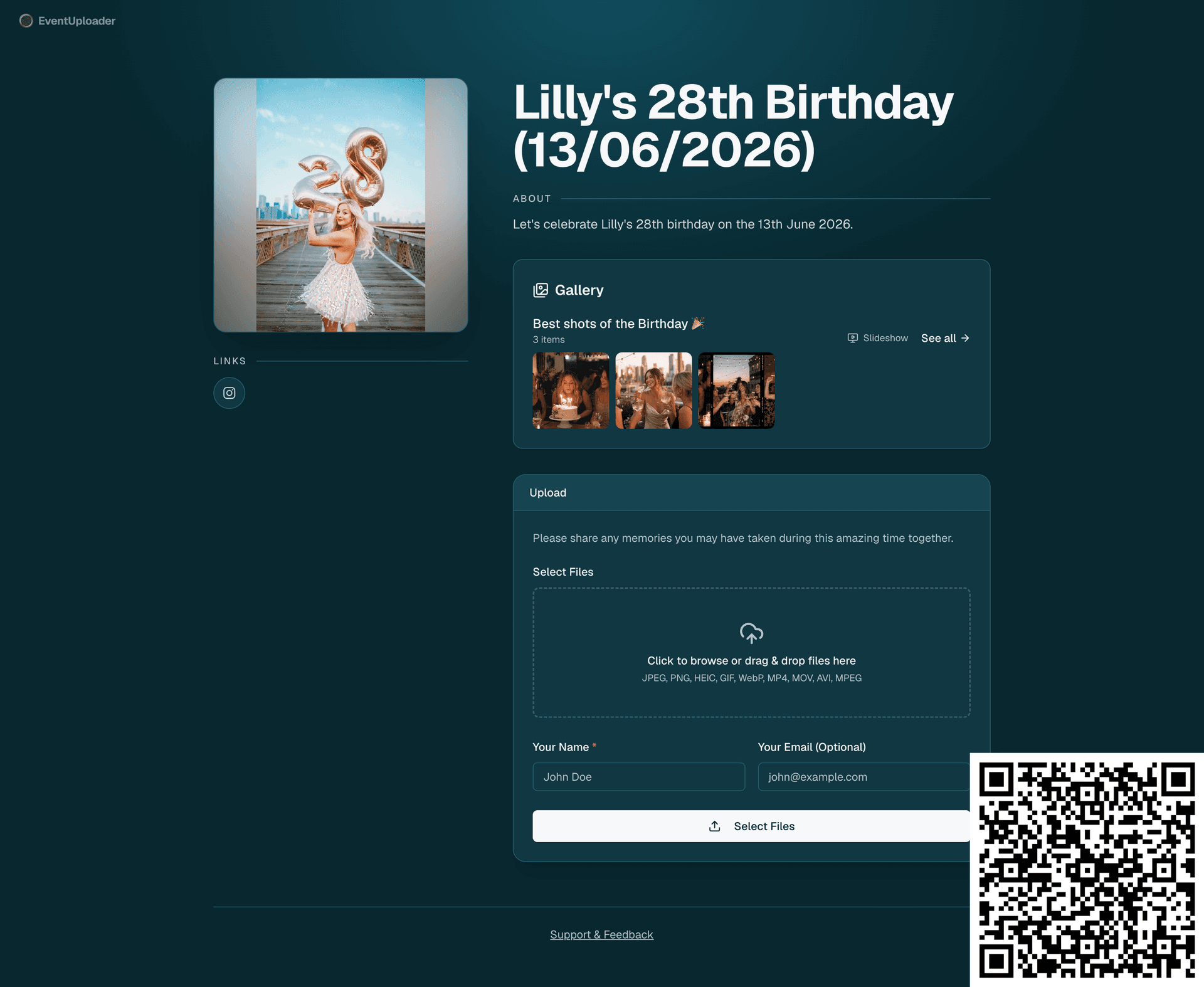
- < 2 minto set up your first event
- Originalquality kept, no fixed per-file limit
- 0apps or accounts needed for guests
Simple 3-Step Process
From setup to download in minutes
- 01
Create & Customize
Sign in and create an event with your branding, custom messages, and file size limits.
- 02
Share & Collect
Share your unique link or QR code. Attendees upload photos & videos straight from their phone.
- 03
Manage & Download
View all uploads in your dashboard. Control upload status. Choose your subscription plan and download.
Share the memories back with everyone
Collect photos and videos from your guests, hand-pick the best, and publish a gallery on the very same link they used to upload — no new app, no new URL to share.
One link, both ways Guests upload and then browse the published gallery at the same link you already shared.
You stay in control Only the media you select appears. Publish the album when you're ready, unpublish anytime.
Photos and videos Build a beautiful album of images and clips that everyone can view and download.







Sent by a guest, 4 seconds ago
https://www.event-uploader.com/upload/lillys-28th-birthday-13062026Put the gallery on the big screen
One click turns your album into a full-screen slideshow. Plug a laptop into the venue's TV or projector and every photo and video your guests upload joins the show within seconds — no refresh, no one at the controls.
Live, without reloading New uploads jump the queue, so guests see their shot on screen moments after sending it.
Your pace, your sound Choose how long each photo stays up. Videos autoplay to the end, muted or with sound.
On by default, off in a click Every album has it out of the box. Turn it off or retune it from the dashboard, even mid-event.
Everything You Need
Professional event media collection platform
No Upload Ever Fails
- Guests can always upload — even if your storage is full
- Anything over your plan is kept safe, just locked
- Upgrade and every locked file unlocks instantly
- 10GB of overage room past your plan, included
Custom Branding
- Your brand colors and logo
- Personalized welcome message
- Unique look for every event page
Upload Control
- Pause, resume, or stop anytime
- Real-time status updates
- Per-event file size limits
Secure Storage
- Enterprise-grade AWS S3 storage
- Private, encrypted transfers
- Always accessible from your dashboard
- Running out never costs you a memory
Shareable Links
- One unique URL per event
- Printable QR code included
- Branded preview card when the link is shared in chats and social apps
- Works in any mobile browser
Event Dashboard
- Track uploads as they arrive
- Monitor storage usage
- Manage every event in one place
Easy Downloads
- Download individual files
- Bulk export everything as ZIP
- Original files, untouched
Send Any File by Link
- Share one photo or video with a private link
- They download the original, no account needed
- Turn the link off anytime
Shareable Gallery
- Curate the best uploads into an album
- Publish on the same link guests used
- Unpublish anytime
Live Slideshow
- Full-screen on any TV or projector
- New uploads appear within seconds
- Set the pace and the sound
AI Similar Photos
- Groups duplicates and bursts automatically
- AI marks the best shot of each group
- Clear out the extras in a few taps
Original Quality
- No compression or re-encoding
- Full original resolution kept
- Download the exact files guests shared
Built On Your Feedback
- We ship improvements constantly, guided by what users ask for
- Tell us what is missing, broken, or slowing you down
- Every message is read by the people building the product
Flexible Subscription Plans
Choose the perfect plan for your storage needs
Free
0.5GB Storage
Perfect for trying out the service
One Timer
50GB Storage
One-time payment for a single event window
Light
50GB Storage
For creators running events regularly
Pro
500GB Storage
For power users and large events
Compare plans
| Plan | Free | One Timer | Light | Pro |
|---|---|---|---|---|
| Price | $0 forever | $25 one time | $12/month | $40/month |
| Storage | 0.5GB | 50GB | 50GB | 500GB |
| File retention | Files kept until you delete them | Files kept until you delete them | Files kept until you delete them | Files kept until you delete them |
| Upload window | 2 day upload window from event creation | 30 day upload window from event creation | Unlimited upload days | Unlimited upload days |
| Unlimited events | Included | Not included | Not included | Not included |
| Basic support | Included | Not included | Not included | Not included |
| QR code generation | Included | Included | Included | Included |
| Custom branded page | Included | Included | Included | Included |
| No watermark | Not included | Included | Included | Included |
| Public gallery & shareable albums | Not included | Included | Included | Included |
| AI features | Not included | Not included | Included | Included |
| Priority support | Not included | Not included | Included | Included |
| Zip bulk download | Not included | Not included | Included | Included |
Frequently Asked Questions
Everything you need to know before you start
What is EventUploader?
+
EventUploader lets event organizers create branded upload pages where attendees can submit photos and videos directly from their phone or computer — no account required. Organizers manage everything from a single dashboard.
Can attendees see the photos after the event?
+
Yes. With the shareable gallery, you can curate the best uploads into an album and publish it on the same link guests used to upload — so everyone can browse and download the memories afterwards. You choose exactly which media is shared, and can unpublish anytime.
Can I show guests' photos on a screen during the event?
+
Yes. Every published album has a slideshow button that plays photos and videos full-screen, one after the other. Put it on a TV or projector and new uploads appear in the slideshow within seconds, without reloading the page. You choose how long each photo stays on screen and whether videos play with sound, or turn the slideshow off, from the Album tab of your dashboard.
Can EventUploader find duplicate or similar photos?
+
Yes. Turn on photo analysis in your event's Intelligence tab and EventUploader groups the photos that look alike: the same picture uploaded by several guests, and bursts of the same moment. AI marks the best shot of each group, and you select the ones to delete or take out of your album. It's opt-in per event and available on every plan: photos are analyzed by Google's Gemini AI from small previews, and nothing is shared with it until you turn it on.
Can I send one photo or video to someone?
+
Yes, on any paid plan (One Timer, Light or Pro). From your dashboard, create a private link for any file and send it by text, email or chat. Whoever has the link can view the file and download the original, full-quality version without creating an account. Nobody else can find it, and you can turn the link off at any time.
Is there a free plan?
+
Yes. Every account starts with 500MB of free storage, enough for a small event. Paid plans unlock more storage and longer upload windows.
What happens if I run out of storage during my event?
+
Your guests keep uploading — we never turn them away mid-event. Anything past your plan's storage is still received and stored safely, it just arrives locked: you can see that it's there but not view or download it until you upgrade. The moment you upgrade, every locked file unlocks, oldest first, and nothing is ever deleted. We keep accepting uploads for 10GB past your plan limit, which covers even a very busy wedding.
Do attendees need to create an account to upload?
+
No. Attendees only need the unique upload link or QR code for the event. They can optionally leave their name and email, but no sign-up is required.
What file types and sizes are supported?
+
Images (JPEG, PNG, HEIC, GIF, WebP) and videos (MP4, MOV, AVI, MPEG). Organizers can set a per-file size limit for each event, up to their plan's storage, and restrict to images-only, videos-only, or both.
How are uploads secured?
+
Files are stored in private AWS S3 buckets. Uploads happen over HTTPS using short-lived signed URLs, and only the event organizer can view or download files via the dashboard. Database access is gated by row-level security.
Can I use EventUploader for weddings, parties, and conferences?
+
Yes — it is designed for any event where you want to collect media from attendees: weddings, birthdays, corporate events, conferences, festivals, sport tournaments, and more.
Can I generate a QR code for my event?
+
Yes. Every event gets a unique QR code you can print and display so guests can scan and upload from their phone.
Can I pause or close uploads during or after the event?
+
Yes. Each event has three states — active, paused, or stopped — that you can toggle in real time from the dashboard.
Supported files at a glance
- Photos
- JPEG, PNG, HEIC, GIF, WebP
- Videos
- MP4, MOV, AVI, MPEG
- Max file size
- Configurable per event, within your plan limits
- Upload rules
- Photos only, videos only, or both — you choose per event