How to Make a Birthday Photo Video in 5 Easy Steps
Learn how to make a birthday photo video that actually captures every guest's angle. Get photos from phones, sequence them, add music, and share the final edit.
The biggest challenge in making a birthday photo video isn't editing. It's getting guests to share at all, especially when 88% of guest photos never reach the host. A reliable workflow starts with a private, no-app upload page and clear prompts, then turns the incoming clips into a short, well-paced story.
You know the scene. The candles are lit, someone starts a spontaneous dance, a child says something hilarious, and the guest of honor is busy greeting relatives or stopping a game from becoming a full-contact sport. Later, the birthday video looks polished, but it misses the moments that happened outside the host's line of sight.
That gap exists because taking a photo is easy while contributing it is a separate task. Guests may keep images in their camera roll, forget which group chat to use, hesitate to install an app, or worry that uploading means giving away control. The best birthday photo video is therefore designed before anyone presses record.
Table of Contents
- Why Most Birthday Videos Miss the Best Moments
- Setting Up a Friction-Free Collection Hub
- Curating and Sequencing Your Memories
- Choosing Music That Matches the Mood
- Privacy, Consent, and Guest Trust
- Exporting and Sharing the Final Result
Why Most Birthday Videos Miss the Best Moments
A birthday party creates several overlapping viewpoints. One guest captures the cake from the front, another records the reaction from behind the crowd, and a child films the room while everyone sings. The host usually sees only the moments happening directly around them, then receives a small selection afterward.
The problem isn't a lack of cameras. Smartphones became the dominant camera in the United States by the early 2010s, making everyday capture and immediate sharing much easier, while Ofcom's 2024 communications research reported that 94% of adults in the UK owned a smartphone. Guests already have the equipment. They still need a contribution path that feels obvious and safe.
The participation gap is practical
A guest who has to download an app, create an account, find a party code, and grant several permissions has multiple chances to abandon the task. A guest who sees a QR code, scans it with the camera, and lands directly on an upload page can contribute before the next song starts.
Social awkwardness matters too. People don't always want to interrupt the host and ask, “Where should I send this?” Others assume somebody else has already shared the clip. Without a direct invitation, the silent observer remains silent.
Practical rule: Treat uploading as part of the party experience, not as an administrative request guests must remember later.
A collaborative workflow solves the visibility problem by separating hosting from collecting. The host can enjoy the celebration while guests contribute from their own perspectives. That approach also protects the final edit from becoming a highlight reel built from only the most organized guest's phone.
The first design decision is simple: remove every unnecessary action between a guest's camera roll and the shared gallery. Once participation becomes easy, editing has something worthwhile to work with.
Setting Up a Friction-Free Collection Hub
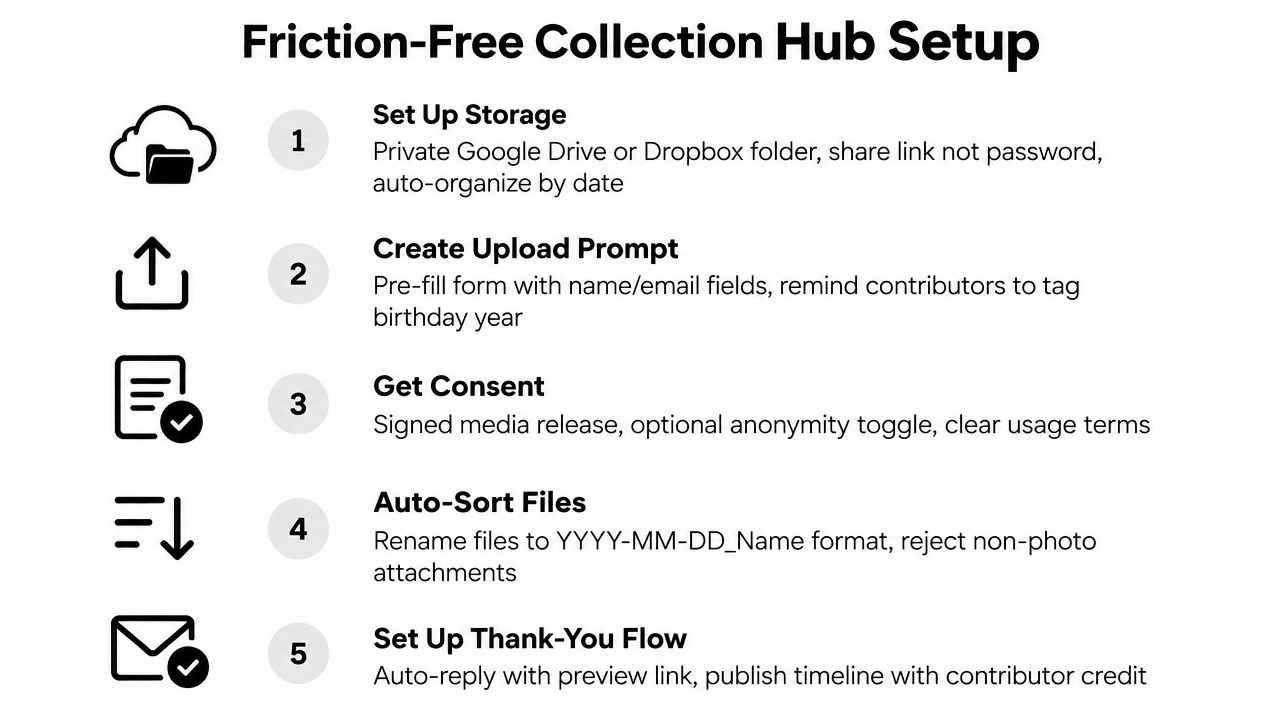
Start with a dedicated gallery or upload page for this birthday. It should open in a mobile browser, require no app download and no account creation, and explain in plain language what guests can do there. A private upload space is more useful than a generic cloud folder because the invitation, consent message, and destination appear together.
Create the page before the party, then generate a QR code that points directly to the upload screen. Independent setup guidance recommends placing the code at entrances, tables, bars, and photo areas, then announcing it 2 to 3 times during the event. The same guidance says the setup can be completed in about 2 minutes, though the exact time depends on the service and how much customization you add. See this birthday party photo collection workflow for a practical example.
Build the invitation around one clear action
Your sign should tell guests exactly what to do:
Scan to share your birthday photos and videos. No app or account needed. Upload only what you're comfortable sharing.
That message handles the three objections that commonly stop contributions, effort, confusion, and uncertainty. Put the QR code where guests naturally pause, not only on a small card hidden near the gift table. The entrance catches people before the party gets busy, the dessert table catches them when phones are already out, and a photo area gives them a direct reason to contribute.
Repeat the invitation verbally without pressuring anyone. Ask the person making a group photo to upload it, invite guests to share clips from their camera roll, and remind everyone that late uploads are welcome.
Choose a hub that supports the whole lifecycle
A basic shared folder can work, but it may expose file names, invite guests into a confusing interface, or make moderation difficult. A dedicated event uploader can provide a branded page, one link or QR code, live incoming media, upload controls, and a gallery for sharing afterward. EventUploader is one option that supports a branded upload page and phone-based uploads without an app or account.
Before the party, test the page from an iPhone and an Android phone. Check that the upload button is visible, the privacy message is understandable, and a guest can finish without creating credentials. A five-minute test prevents a room full of guests from discovering the same broken step.
Curating and Sequencing Your Memories
Don't begin by asking which clips look the most cinematic. Begin by asking what happened. A strong birthday photo video usually follows the emotional shape of the day, arrival, settling in, shared activity, the main celebration, and the quieter moments afterward.
Create a rough sequence before opening advanced editing controls:
- Arrival: greetings, decorations, gifts being placed, and guests entering.
- Build-up: games, food, conversations, and small reactions.
- Centerpiece: the cake, candles, singing, surprise, or group activity.
- Release: laughter after the main moment, dancing, hugs, and the final wave goodbye.
Keep the strongest version of each event. If five guests captured the candles, choose the angle with the clearest reaction and cleanest sound, then use a second clip only if it adds a different perspective. Repetition slows the video and makes every later moment feel less important.
Protect the natural rhythm
Mix still photos with short video clips instead of treating every upload as equal. Let a meaningful reaction breathe for a moment, then cut away before the clip becomes repetitive. Use simple transitions, often a straight cut or a restrained dissolve. Decorative effects can make a family memory feel dated quickly, while clean sequencing keeps attention on the people.
Vertical clips shouldn't automatically be cropped into a horizontal format. Cropping may remove the child blowing out the candles or the relative reacting at the edge of the frame. If you need a wider presentation, use a blurred or colored background rather than sacrificing the subject.
For photos that deserve movement, a gentle zoom or pan is enough. If you want to experiment with turning a still image into a more animated segment, this guide on how to turn a photo into video offers an additional workflow. Use that technique selectively, because a birthday video shouldn't make every candid moment look artificially produced.
Write a short label for each chapter while you edit. “Before the surprise” and “The cake crew” are more useful than generic file names, especially when several relatives contribute similar footage.
Choosing Music That Matches the Mood
Music should support the footage, not cover it. Use a lively track while guests arrive or dance, then reduce the tempo for gifts, speeches, or a quiet family portrait. If the strongest clip contains a funny line or emotional reaction, lower the music beneath the original audio instead of forcing the song to play at one volume.
The collection timeline affects this decision. A 2026 event-media dataset found that only 22% of all files arrived within 24 hours of the first upload, while 54% arrived within a week and 29% arrived more than two weeks later. Birthday media doesn't stop appearing when the party ends, so don't lock the soundtrack before the gallery has had time to fill. The dataset report also recorded a median of 34 files across 48 birthday events, compared with 37 files across 799 events, giving you a useful reminder that a birthday gallery may be substantial without being unmanageable.
Edit audio in layers
Use the song as a bed, the original clips as evidence of the party, and silence as a pacing tool. Keep room sound when it carries laughter, singing, applause, or a personal message. Remove wind noise, accidental conversations, and long stretches where the camera points at the floor.
Choose music from a source that grants the usage rights you need. A track that works in a private family link may trigger a mute or removal when posted publicly. Save the license information with the project, and export a private version if you want to preserve original audio that you can't publish openly.
The finished birthday photo video doesn't need a complicated soundtrack. One suitable track, carefully ducked beneath important speech, usually beats a sequence of unrelated songs.
Privacy, Consent, and Guest Trust
A guest uploads a child's photo, a private conversation, or an image carrying location data. The host then shares the finished birthday video publicly without realizing what the original files reveal. Set the boundaries before collecting anything, and treat every upload as personal material rather than public content.
Give guests four clear answers before they contribute:
- Who can see the gallery?
- Why are you collecting the files?
- Will you publish any of them publicly?
- When will you delete the gallery?
Explain who collects the photos, why they are needed, and how long the files will remain available. Set a deletion period instead of leaving the album online indefinitely. Photos may constitute personal data, so retention belongs in the hosting plan, not as an afterthought.
Privacy concerns affect participation. Pew Research Center found that 81% of Americans feel they have little or no control over how companies collect data Pew Research Center on data-collection control. A short promise often reassures guests more effectively than a long legal notice: “This private gallery is for the family, and we'll delete it after the recap is shared.”
Make consent visible and optional
Attendance does not grant permission for every use. Let guests upload anonymously if they prefer, state whether files may appear in a private recap, and ask separately before publishing identifiable images. Parents and guardians need a direct way to raise concerns about photos of children.
A consent form helps when the birthday is large, public-facing, or connected to an organization. This guide to photo consent forms can help structure the notice without making the upload process intimidating.
Access should match the guest list and the project. Review the gallery before editing, remove accidental uploads, and strip location metadata if the chosen tool supports that control. Tell contributors how to request removal, then honor those requests promptly. Trust grows when guests see that the host has considered what happens after each file leaves the phone.
Exporting and Sharing the Final Result
Export two versions for two different jobs. Make a polished birthday photo video for watching, then keep the original uploads in a private gallery so guests can retrieve their own photos and clips. The edited video delivers the story. The gallery preserves viewpoints and moments that could not fit the edit.
Before exporting, watch the full video on a phone, not only on the editing screen. Check faces near the edges, dialogue under the music, portrait clips inside the frame, abrupt volume changes, and repeated moments. Choose the resolution and format for the main viewing destination. A private family link can retain higher quality, while a social post may require a platform-specific format and shorter runtime.
The dataset behind the birthday event figures reported an average file size of 1.1 MB across 80,098 files, with 5.2% of files being videos, as documented in the birthday event dataset report. These figures describe collected source material, not a target export size. Keep original uploads where possible, then create a convenient viewing copy separately. For practical guidance on preserving usable quality, see this guide to high-quality video downloads.
Give guests a clear handoff
Send one message containing the finished video, the gallery link, and simple instructions for downloading personal contributions. A single handoff prevents links from being scattered across group chats, where guests may miss the final version or download the wrong file.
For a private audience, use gallery access controls and state how long the files will remain available. For public sharing, export a copy without footage from guests who did not approve public use, and check music rights before posting. If the platform compresses the video, retain a high-quality master in your own storage.
Thank contributors and credit them when appropriate. Leave uploads open long enough for guests who were traveling or busy during the party to send their clips. That final window can recover moments missed on the day and shows that participation does not end when the cake is served.
EventUploader lets you create a branded birthday upload page, share one link or printable QR code, collect photos and videos without app downloads or accounts, and return the finished memories through a shareable gallery. Set up your next birthday collection before guests arrive by visiting EventUploader.