Can You Take Pictures at a Concert? Know First
Can you take pictures at a concert? Phones often yes; pro cameras, flash, and video usually no. Check the artist, venue, and ticket rules before you go.
A phone is often allowed for personal stills at a concert, but there's no universal yes: detachable lenses, flash, supports, and video are commonly banned. If security lets your phone inside, does that also mean you're allowed to photograph the performance?
That's the distinction that catches first-timers. Permission to carry a device isn't permission to use every feature on it. A venue might welcome a quick photo while prohibiting filming, or admit phones only to seal them in pouches before the show.
The useful question isn't just “Can you take pictures at a concert?” It's what you can bring, what you can capture, and when the artist expects you to put it away.
Table of Contents
- What Security Usually Lets In
- Who Actually Sets the Photo Rule
- What Happens When Staff Enforce the Rule
- How Fans Photograph Shows and Keep Phones Respectful
- How to Shoot Well Without Flash
- Check the Policy Then Keep the Memory
What Security Usually Lets In
Phone for personal stills, yes in many rooms. Professional-looking camera kit, don't assume so. Use this packing guide as a starting point, not as permission that overrides your particular event.
What concert security usually allows
| Item | Usual call | Why it is restricted |
|---|---|---|
| Smartphone for stills | Often allowed unless the show is stricter | Small, personal, and less obstructive |
| Fixed-lens compact | Sometimes allowed, decided per show | Less clearly professional than a detachable lens |
| Interchangeable-lens camera | Usually banned | Treated as working-photographer gear and an unauthorized-recording risk |
| Telephoto or long lens | Banned under restrictive equipment policies | Blocks sightlines and signals a commercial shoot |
| External flash | Banned even if a phone is allowed | Distracts performers and cannot light a distant stage |
| Tripod, monopod, or selfie stick | Banned under restrictive equipment policies | Obstructs views and creates a crowd hazard |
| Continuous video or livestream | Usually banned | Many tickets name recording devices as prohibited |
| Photos or video for sale or publication | Not permitted without authorization | Commercial use requires permission beyond an admission ticket |
A smartphone is the least complicated choice, but an artist can prohibit its camera even when the building normally permits phones. Classical performances, theatre productions, and some seated halls may prohibit all photography during the performance because darkness, quiet, and audience concentration matter.
A fixed-lens compact needs a closer check. Its lens stays attached to the body, unlike an interchangeable-lens camera, but being small doesn't automatically make it acceptable. Look for explicit language permitting personal or compact cameras.
A detachable lens is the warning sign to notice before leaving home. Your mirrorless camera might fit in a coat pocket and be used only for holidays, yet security can still classify it by its removable lens rather than your intentions. A telephoto lens makes that distinction more obvious.
Pack for the door decision
External flashes and camera supports create separate problems. Don't assume an approved camera makes its accessories acceptable, and don't treat a folded selfie stick as harmless because it fits inside your bag.
Recording and commercial use are separate permissions, too. A still-photo allowance doesn't automatically authorize a livestream, a complete song recording, or material intended for sale.
Check these places in order:
- Ticket terms: Look for photography, recording, prohibited items, and artist restrictions.
- The event's venue page: Read the listing for your date, not just the building's general visitor guide.
- Signs and door staff: Follow the instructions applying to that performance.
For organizers, camera rules belong alongside access and safety planning. ABCO Security Services Australia's practical crowd management techniques are a useful companion when planning clear routes and managing audience movement. A separate festival photo collection workflow can handle permitted audience contributions without encouraging people to stop in entrances to upload.
Packing rule: If the event lists an item as prohibited, leave it at home. Don't make admission depend on finding somewhere to store it.
Who Actually Sets the Photo Rule
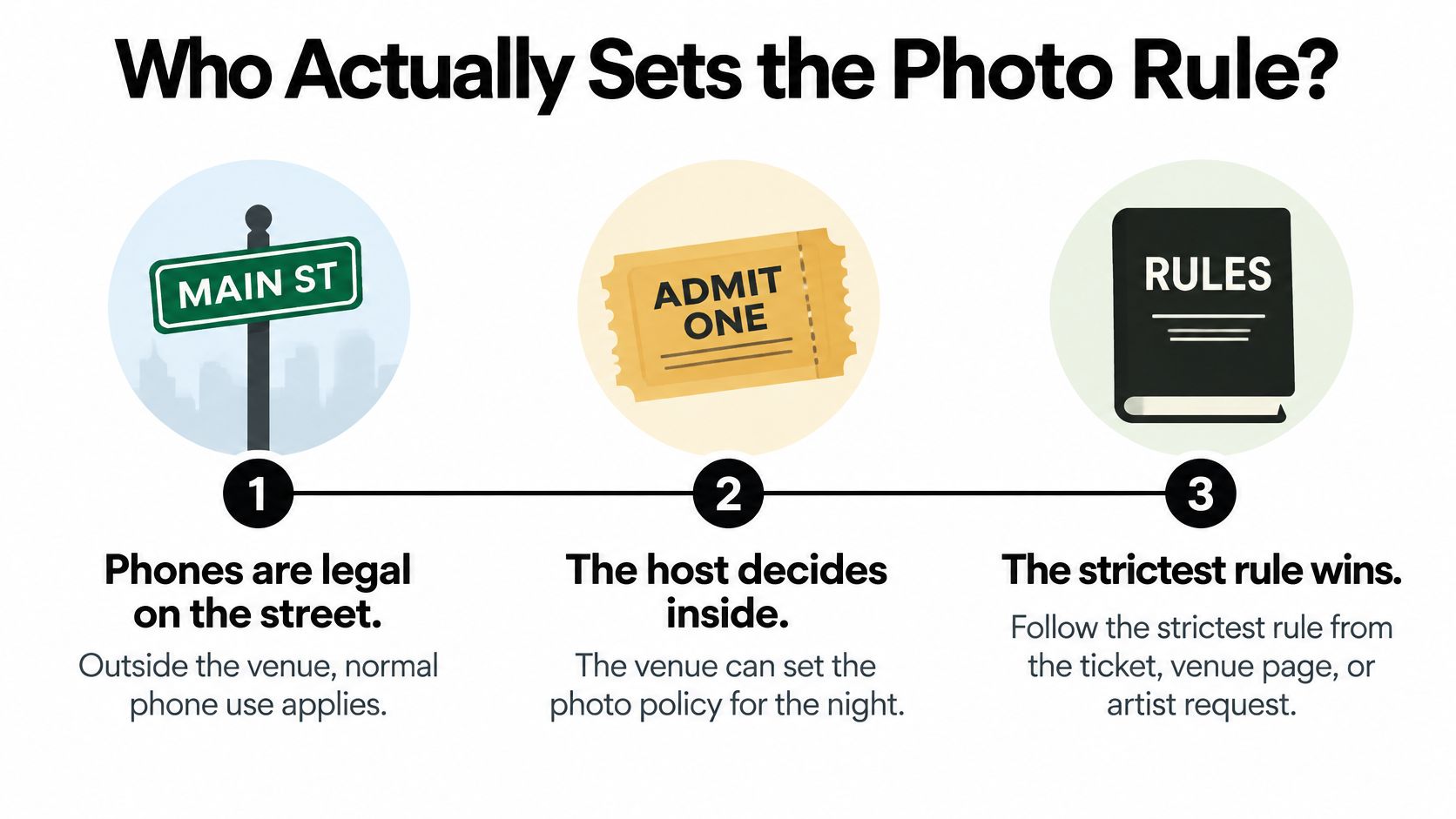
Think of photography rules like house rules at a private gathering. Owning a phone doesn't mean you can use it however you like inside someone else's event. The host can welcome pictures in one space and ask everyone to put cameras away in another.
Say an arena's general website permits smartphones, but the concert listing says the performance is phone-free. The general policy describes the building's normal practice. The show-specific restriction tells you what happens that night.
The people behind the policy
The artist or publicist, venue, and promoter can each shape the conditions of admission and photography. When their instructions differ, follow the stricter applicable restriction rather than choosing the most convenient sentence.
This distinction has a history. As CityNews' account of musicians and smartphone cameras explains, Beyoncé and Prince warned about camera confiscation, Prince addressed photography in his Purple Rules, and Poland's Unsound festival adopted an event-wide no-photo policy in 2013.
As smartphones replaced bulkier personal cameras, venues increasingly separated casual phone photography from equipment that looks like a working photographer's kit. That helps explain why a room can contain glowing phones while security refuses a small mirrorless camera at the entrance.
The policy chain is easier to understand when you separate general phone ownership from permission inside the event.
A photo pass is a different agreement
Accredited concert photographers may work under an opening-songs-only, no-flash arrangement. Their access comes from a separate agreement, and the artist's publicist or venue can change its scope.
- A ticket buys audience admission: It doesn't grant access to the photo pit.
- A credential grants specified access: It doesn't necessarily authorize photography throughout the performance.
- Personal photography remains conditional: Organizers can permit it while restricting flash, obstructed aisles, intrusive images, and commercial recording.
Don't rely on fan comments saying the artist usually allows pictures. Those comments may describe a different tour, building, or promoter. If an usher gives an instruction that conflicts with your understanding, put the device away and ask for clarification without continuing to shoot.
What Happens When Staff Enforce the Rule
Ticketmaster's camera-policy guidance advises checking the event-specific venue policy, because many venues prohibit cameras or recording devices altogether. A general arena FAQ isn't enough if the headliner has added restrictions.
The published patterns illustrate the distinction. Barclays Center permits smartphones unless a particular show imposes a stricter rule, while restricting interchangeable-lens cameras, telephoto lenses, external flash, tripods, monopods, and recording devices. Edmonton's Commonwealth Stadium allows personal cameras and cell phones while prohibiting detachable-lens cameras, video devices, and flash.
Those examples aren't permission slips for another venue. They show which details to look for when you read your own event's rules.
How photo rules are enforced at the show
| Situation | Typical enforcement | What to do |
|---|---|---|
| Phone stills where phones are allowed | Rarely stopped unless the phone blocks a view or flash fires | Shoot briefly at chest height with the screen dim |
| Detachable-lens camera at bag check | Refused entry or held until after the show if storage is offered | Leave it behind; use a phone if phones are allowed |
| Flash aimed at the stage | Staff may intervene immediately; nearby fans may object | Disable flash before raising the phone |
| Ticket holder acting like pit media | No working-photographer privileges | Stay in audience areas unless separately accredited |
| Phone-free tour with locked pouches | Phone sealed on entry, with access handled in designated areas | Arrange medical, transit, and message access before the pouch locks |
Treat an intervention as an instruction
At bag check, explain what you're carrying accurately. Calling an interchangeable-lens camera a personal camera won't change its construction, and removing the lens before inspection doesn't make the equipment a fixed-lens compact.
If staff refuse the camera, ask what approved options exist. Storage may not be available, and leaving the queue to return equipment can cost valuable time. Don't assume there's a cloakroom, an equipment locker, or permission to leave and re-enter.
During the performance, lower the device first. If you don't understand the problem, ask whether the issue is photography itself, flash, recording, or blocking another person's view. Continuing to shoot while arguing makes it harder for staff to resolve a simple misunderstanding.
A friend's successful recording at a previous show tells you what happened then. It doesn't establish permission tonight.
A phone-free pouch system also needs preparation rather than improvisation at the entrance. Ask how you'll access necessary phone functions and where staff can help. Don't test whether you can get away with opening the pouch or using a second device.
The practical response is consistent across these situations: comply, clarify, and adjust. Your aim is to get inside with permitted equipment and enjoy the performance, not to win a debate over how another building handled a camera.
How Fans Photograph Shows and Keep Phones Respectful
Can you keep a concert memory without watching the whole show through your screen? Start by separating three different activities: brief still photos, continuous video, and phone use at a phone-free event. Permission for one doesn't automatically include the others.
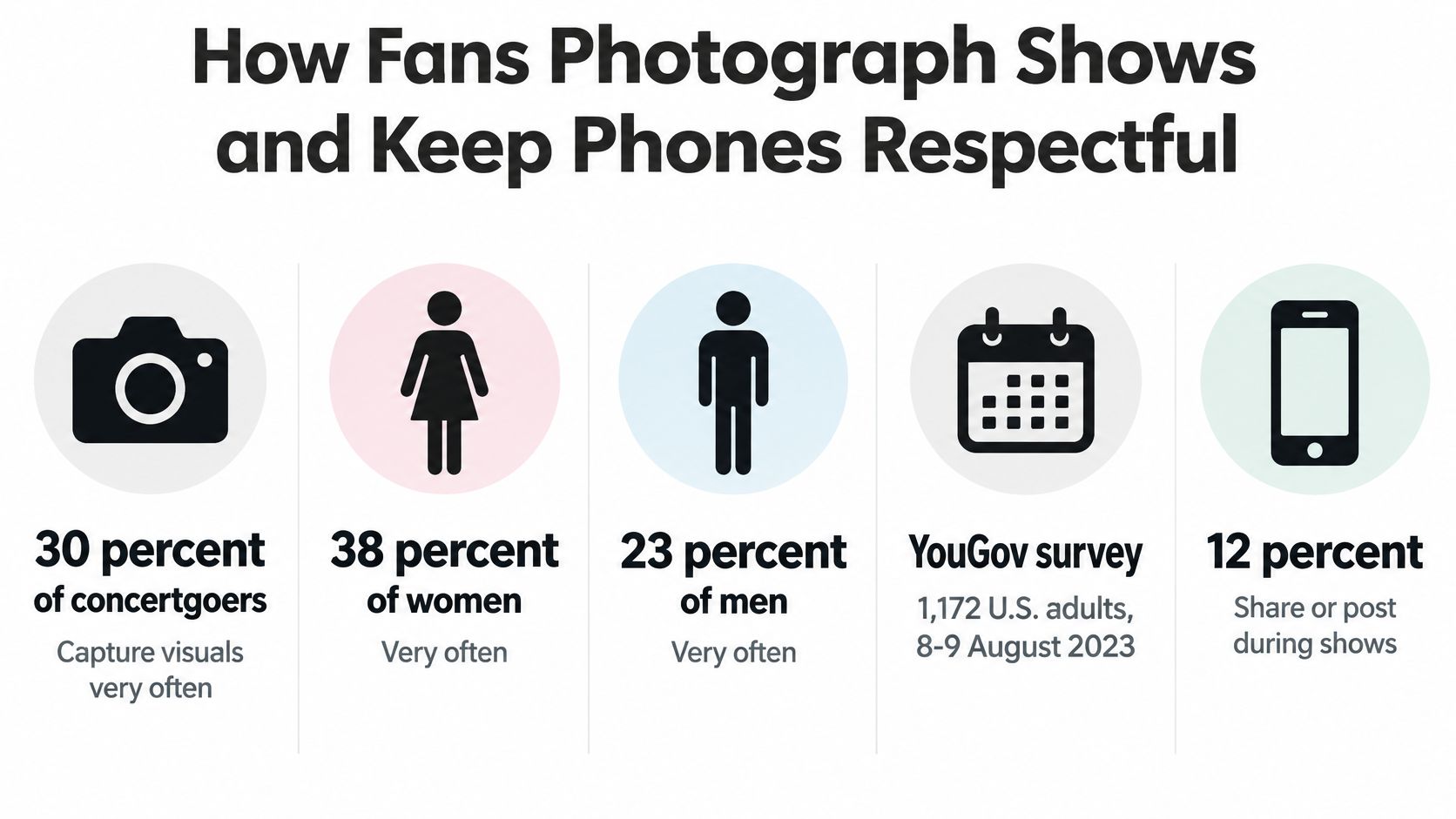
In an online survey conducted on August 8–9, 2023, with a nationally representative sample of 1,172 U.S. adults, YouGov found that 30% of concertgoers captured visuals very often. The survey also found that 26% very often shared concert visuals on social media. These habits are common, but popularity doesn't establish permission.
A GroupM Entertainment & Sports Partnerships study, described by Mobile Marketer, placed taking a photo or video as the second-most popular concert or festival engagement, at 63%. That demand makes clear why organizers should state the rule rather than leave guests to guess.
The survey graphic below shows how concertgoers use phones to capture and share visuals. Its final sharing label refers to people who did not use their phones to capture concert visuals, not to a sharing statistic.
Brief stills aren't continuous recording
A quick still photo takes a moment. Recording a whole song keeps your screen up for much longer and can block the view of people behind you. Follow the event's specific rule, then put the phone away.
- Choose a moment: Wait for a bright lighting cue, take a few stills if allowed, and lower the phone.
- Keep the view clear: Don't extend your arm over the row behind you or hold a screen in front of someone's face.
- Reduce screen glare: Lower brightness before the room goes dark.
- Separate capture from posting: Save editing, captions, and uploads for after the performance.
Afterward, ask friends before sharing close-up images of them, and avoid making strangers' private reactions the focus of a post. If you share permitted photos, these tips for captioning social media photos can help you describe the moment without composing a caption during the set.
Make phone-free access workable
Phone-free events raise a separate question: how will you access a needed phone function? Medication reminders, translation, accessible communication, family contact, and transport information may all matter.
Ask the organizer in advance how to arrange access, and explain the function you need. The process may differ by need, and access to a phone doesn't automatically mean permission to photograph or record. Clear instructions from organizers also help staff respond consistently without asking attendees to repeat sensitive details.
Necessary phone access and permission to record are different questions.
Collect memories outside the restricted set
Organizers can invite photos of arrivals, friends, outfits, approved installations, and post-show gatherings without inviting cameras during the music. A QR code at a natural stopping point can direct guests to an upload option. Explain when and what they may submit, and make the performance restriction just as visible.
A shared album, organizer-managed upload form, or branded collection page gives guests a place to contribute. A useful setup lets them upload without a social account, gives the organizer control over incoming images, and makes approved favorites available in a shared gallery.
Collecting an image and posting it publicly are separate steps. This guide to social media photo sharing can help organizers plan how images move from guests' phones to a shared destination. Collect only permitted material, explain how it will be used, and don't treat an upload invitation as permission to record the performance.
How to Shoot Well Without Flash
Once photography is explicitly permitted, good results depend on balancing movement, exposure, and focus. Flash won't usefully illuminate a distant performer from the audience, so work with the available light instead.
Sony's concert-photography guidance recommends Auto ISO with a minimum shutter speed of approximately 1/125 to 1/250 second. Use the faster end for energetic movement and the slower end when the performer or available light allows. These are starting points for an authorized camera, not permission to bring prohibited equipment.
Set the camera for the performer
Open the widest available aperture, enable Auto ISO, and use face or subject autofocus if available. The aperture lets in light, the shutter controls movement blur, and Auto ISO adjusts sensitivity to help maintain exposure.
A faster shutter can preserve a dancer's gesture, but it may push ISO higher. Accept some image noise rather than ending up with a blurred face. A slightly noisy image can still be useful; movement blur often hides detail.
- Expose for the face: A mostly black background can trick the camera into brightening the whole scene, washing out skin and stage lights.
- Wait for useful light: Take a short burst when a spotlight reaches the performer instead of shooting continuously through darkness.
- Check briefly: Confirm focus and exposure, then lower the camera.
Phone users can apply the same priorities without manual controls. Clean the lens before the show, tap the performer's face to focus and set exposure, and lower exposure if the face looks washed out. Avoid heavy digital zoom, which magnifies an already difficult image, and long night-mode exposures, which can blur a moving performer.
Keep lasers out of the lens
Don't point your camera into a concert laser source. A concentrated beam can damage a CMOS or CCD sensor even when the display is safe for human eyes.
Photograph the effect indirectly, in haze or against a screen. If a beam's source lines up with your lens, stop shooting and lower the device.
Camera safety: Your eyes and your camera sensor don't respond to a concentrated laser beam in the same way.
For broader preparation, these event photography tips can help you plan what to capture while keeping the performance in view. Deliberate framing and lighting practice can also come from learning to capture your artwork like a professional.
Camera technique never creates permission. If the performance prohibits photographs, put the camera away.
Check the Policy Then Keep the Memory
Make the camera decision before you leave, while you still have time to change your bag. A little preparation is easier than choosing between your equipment and your place in the entry queue.
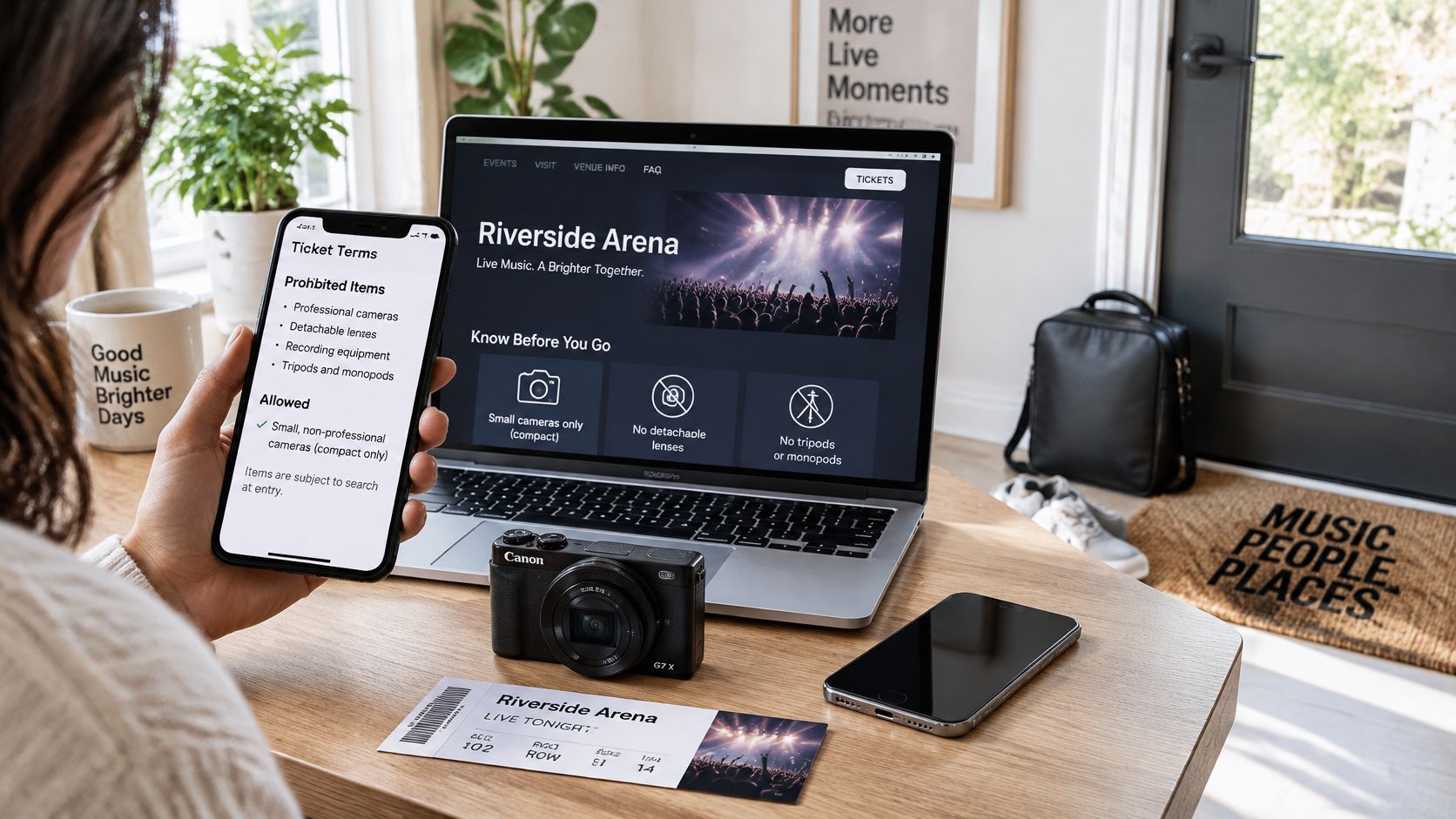
Use the event listing and ticket together when checking what to pack.
Your before-during-after checklist
- Before leaving: Read the ticket conditions and the venue's listing for your specific performance. Pack only the smallest device the applicable policy permits.
- At the entrance: Follow staff instructions and resolve necessary phone-access arrangements before entering a restricted area.
- During the set: If stills are allowed, capture a brief memory without flash or blocking someone else. If capture is prohibited, keep the device stored.
- Afterward: Save your favorites, check what you're permitted to share, and don't publish recordings the event prohibited.
A no-photo performance doesn't have to mean an evening without pictures. Where permitted, the meeting point, lobby, merchandise area, and gathering afterward can document who came with you and what the night felt like.
Don't assume applause or an encore automatically ends the restriction. Wait for an explicit invitation, a clearly permitted window, or confirmation from staff.
For a visual companion to your preparation, watch the video below.
Give attendees a clear collection plan
Organizers should decide whether the audience may photograph the performance before publishing the ticket information. State what's allowed, what's prohibited, and how people can get help with essential phone access.
If the set should stay phone-free, invite contributions before and after it. Put the upload instructions near arrival and exit points, pause submissions during restricted periods if appropriate, and review the material before publishing a gallery.
A collection page doesn't authorize capture. The artist's conditions still apply, and guests should know whether their contributions will remain within the group or appear publicly.
The decision is straightforward: protect the performance first, then give people an approved way to keep and share the evening.
EventUploader offers a branded upload page and printable QR code so guests can contribute permitted concert photos without downloading an app or creating an account. You can pause uploads during restricted portions and publish selected memories in a shareable gallery afterward. Visit EventUploader to set up a collection point for the moments your event allows.