Shared Photos Online
Shared photos online. Learn how to share photos online with confidence. Compare public, private, and event gallery options and pick the safest, easiest approach

You're looking at the same problem most event hosts discover the morning after a big day. Someone asks for the rooftop toast photo, so you search iCloud, scroll through a WhatsApp thread, open two Google Photos links, and check a Dropbox folder. The original file is buried in one place, a compressed copy is in another, and nobody remembers which guests uploaded anything.
Then the smaller problems appear. A grandparent can't open a link that expires after seven days. A stranger gets tagged by mistake. A guest sends twenty images individually because they can't figure out the album settings. You want every angle of the event, but collecting shared photos online turns into unpaid detective work.
The right choice depends less on brand names and more on the direction of sharing. Are you broadcasting finished images, sending a private album to a few people, or collecting files from a whole group? This guide maps those three paths, compares their practical trade-offs, and shows why a hosted upload page removes much of the scavenger hunt.
Table of Contents
- The Photo Chaos Every Host Knows Too Well
- Three Core Ways to Share Photos Online
- Public Sharing Versus Private Sharing Compared
- Who Really Owns Your Photos After You Post
- Privacy and Safety Checklist Before You Hit Share
- Why a Hosted Event Upload Page Wins for Groups
- Real Events Solved with the Same Simple Flow
- Choosing the Right Sharing Method for Your Moment
The Photo Chaos Every Host Knows Too Well
Saturday morning starts with a simple request. You need the photo of your sister raising a glass during the rooftop toast. One friend says it's in iCloud. Another sends a Google Photos album. The best version may be in a WhatsApp conversation, but finding it means searching through messages, voice notes, stickers, and unrelated screenshots.
You eventually locate a copy in Dropbox. It looks fine on your phone, but it isn't the original resolution. The wedding photographer has one polished set, the guests have hundreds of candid moments, and the files are split across apps that weren't designed to work together. The host becomes the librarian, messenger, and technical-support desk.

Practical rule: If guests need to decide where to upload before they can contribute, many of them won't contribute at all.
The friction gets worse when the group uses different devices and habits. One guest has an iPhone and relies on shared albums. Another uses Android and prefers Google Photos. Someone else doesn't want another app, another account, or another notification stream. Older relatives may be perfectly happy scanning a QR code but have no patience for an invitation flow with multiple permissions.
Privacy creates a second layer of uncertainty. A private-looking link may still be forwarded. A recognizable guest may agree to appear in a group photo but object to seeing it in a public recap. A file can also carry hidden location and device details, even when the image itself feels harmless.
Shared photos online are now part of everyday communication. Pew Research Center documented a major shift in 2013, when 54% of adult internet users posted original photos or videos online, while 47% shared visual content found elsewhere. Those figures had risen from 46% and 41%, respectively, the prior year, showing how quickly visual sharing became mainstream (Pew Research Center's photo and video sharing report).
The solution isn't adding another folder to the pile. It's choosing a sharing path that matches the job.
Three Core Ways to Share Photos Online
Think of photo sharing as three physical places. A public social platform is the town square. A private cloud album is a locked filing cabinet. A hosted event upload page is a shared drop box at the entrance.
Each one works, but each puts a different burden on the host and guests.
The town square
Instagram, Facebook, and X are built for broadcasting. You publish from your own account, your audience watches, and the platform handles discovery, reactions, and resharing. This is the right format when visibility is the point, such as a public festival announcement, a brand launch, or a polished event recap.
The failure mode is predictable. You don't control every screenshot, download, repost, or tag. Guests also aren't contributing to a central library unless you create a very clear hashtag and monitor several conversations. Public posting is a publishing workflow, not a collection workflow.
The locked filing cabinet
iCloud, Google Photos, and Dropbox offer more controlled access. You can invite specific people, send a private link, and keep the album away from a public feed. They're useful for sending a finished set to family members or sharing selected files with a small team.
The host still has to gather the files. Guests may need accounts, compatible permissions, or instructions for adding images. You also become responsible for link access, storage, folder structure, and future cleanup. For practical guidance on preparing product images for online use, this resource on ecommerce listing photography offers useful context about organizing visual assets.
The shared drop box
A hosted upload page changes the direction of traffic. You create one destination, share one link or QR code, and let guests upload from a browser. The organizer reviews and manages the collection afterward instead of chasing every person for a separate album link.
That model is especially useful when guests use different phones or don't want to install an app. It also keeps the event library separate from personal photo storage. For a deeper comparison of practical sharing workflows, see this guide to the best way to share photos.
Public Sharing Versus Private Sharing Compared
Public and private sharing solve different problems, so choosing between them based on convenience alone is a mistake. Public platforms optimize for reach and interaction. Private albums optimize for a defined audience, but they usually assume the organizer already has the files.
| Criterion | Public Social Platforms | Private Cloud Albums |
|---|---|---|
| Audience control | Broad and difficult to limit after publication | Invite-based or link-based access |
| Image quality | Platform processing may alter the uploaded copy | Original files can remain available, depending on settings |
| Discoverability | Strong, especially through profiles, tags, and search | Low, unless someone receives the album link |
| Effort to collect from guests | High, because guests post separately | High, because guests must join or send files into your system |
| Post-event cleanup | Difficult after reposts, screenshots, and tags | More manageable, although shared links and downloads still need attention |
Public sharing makes sense when you want strangers to find the content. A concert organizer promoting the next event, a business publishing approved campaign imagery, or a community group announcing a public moment may value reach more than control. The trade-off is permanent uncertainty once other people copy or repost the images.
Private sharing is the safer default for weddings, birthdays, school gatherings, family milestones, and internal company events. It gives you a defined audience and a better chance of controlling access. It still doesn't solve the central event problem, though. A private album is often a place to view files, not an easy way for dozens of guests to contribute them.
Audience rule: Use public sharing for broadcasting finished work. Use private sharing for a known group. Don't confuse either option with a collection system.
Image quality deserves a closer look. Some services keep a high-quality original while displaying a smaller preview, but others re-encode uploads or make guests download through a preview interface. If you need prints, editing, or a later archive, confirm how the service handles original files before the event.
A hybrid approach can work well. Publish a small, approved selection publicly, then keep the complete guest collection private. That gives the event a public highlight without turning every candid image into public property. The ownership question remains, however, because private visibility doesn't automatically mean you control the file, its metadata, or every copy.
Who Really Owns Your Photos After You Post
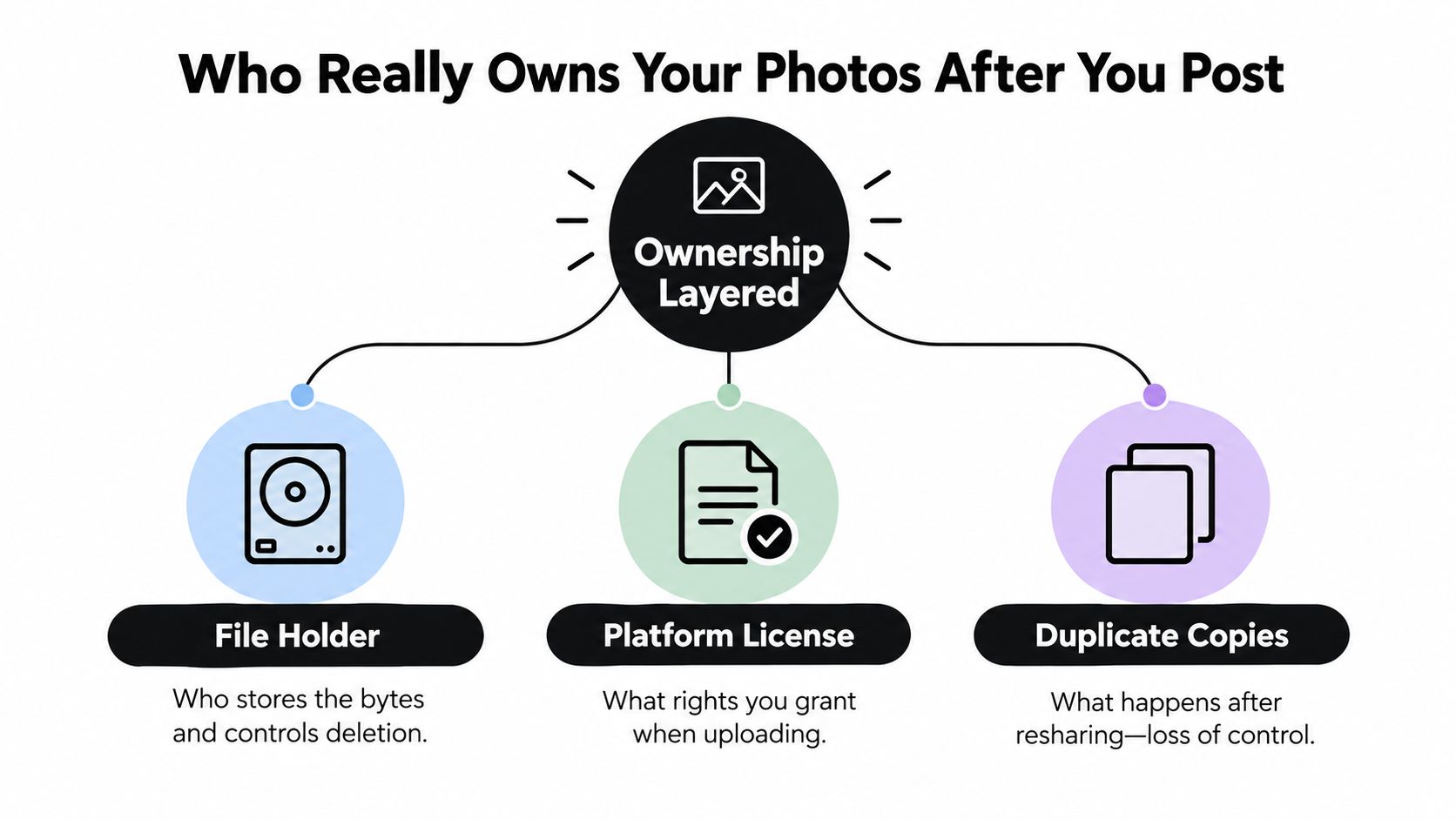
“Ownership” is not one setting. It has three layers: the original file, the platform's permissions, and the duplicate copies created after sharing.
Start with the file itself. Who stores the upload? Who can delete it? Does the service keep the original, or produce a resized or re-encoded version? A private album can limit access while the platform still controls storage and delivery.
The metadata layer
The visible image is only part of the file. EXIF metadata may include the timestamp, GPS coordinates, camera model, lens information, and other technical tags. Those details can remain attached unless the service removes them during upload. A shared photo may therefore reveal where and when it was taken, even when the scene appears harmless.
That matters in family homes, schools, workplaces, and event venues. A downloaded original can contain information that a browser preview hides. Anyone who receives the file may inspect those tags with standard photo software.
The permission layer
Uploading means accepting the platform's rules. Those terms set out what the service may do with hosted content, how images appear, and how long copies may stay in backups or caches. Read them before placing an event archive on a service you do not understand.
For group events, a self-controlled gallery or hosted upload page gives the organizer clearer decisions. You can set who views the collection, close uploads after the event, choose how guests receive the finished gallery, and select the export format. That structure addresses the practical problem of collecting photos from guests using different phones and apps. It does not provide complete control after guests download the files, but it gives you a defined boundary at collection.
The duplicate layer
Once a photo is shared, control spreads. Guests can save files, forward links, take screenshots, or upload copies elsewhere. Private settings reduce exposure, yet they cannot prevent every action by an authorized viewer.
Ownership reminder: Posting does not erase your connection to the photo. It creates shared control. Choose a service that gives you clear options for deletion, access, metadata, and export.
Privacy and Safety Checklist Before You Hit Share
Privacy advice matters only when it changes your process. Before uploading an event collection, review the files, the people in them, the access settings, and what happens after guests download copies. Apply extra care when children, homes, schools, or workplace activities appear in the frame.
1. Remove hidden file data
Export a clean copy or use a metadata remover before sharing. Confirm that it removes GPS coordinates, timestamps, camera details, and other EXIF fields, rather than only visible captions. Keep the untouched original in your private archive for printing or later editing, then upload the cleaned version when location and device details are unnecessary.
2. Review the entire frame
Inspect the background, not only the person facing the camera. Crop house numbers, school signs, identity cards, vehicle plates, private documents, and visible screens. Blur or remove strangers whose likeness you are not authorized to publish.
A group photo still requires care. Permission to take an image does not automatically cover publication, and recognizable people may need written consent in some jurisdictions, according to official guidance on image publication and consent.
3. Set access before sending the link
Choose a restricted audience, password, guest list, or approval workflow when the service supports it. Treat a shared link like a credential. Do not post an “unlisted” address in a public forum or forward it widely without checking who can open it.
An expiration date can limit access after a short event window, but it may also lock out guests who visit later. Set the closing date clearly, tell guests about it, and export your collection before disabling access.
4. Record consent and plan takedowns
Tell recognizable guests how the images will be used. Provide a simple way to decline publication or request removal after the event. Use this process especially for minors and corporate images that could appear on an intranet, website, or marketing channel.
Privacy continues after collection. Guests may download originals and share them elsewhere, so protect both the gallery and the exported files. Eurostat's data protection information covers user steps such as restricting access to social profiles and shared online storage (Eurostat data protection information).
Before writing event instructions or approving a new service, follow this data security best practices guide. State who can upload, who can view, how long access remains open, and where guests should report a problem.
A short video can reinforce safer sharing habits:
Why a Hosted Event Upload Page Wins for Groups
A hosted event upload page solves the problem that public feeds and personal folders leave untouched: getting files from many people into one place.
The flow is straightforward. The organizer creates a branded page, shares one link or printable QR code, and guests upload from the browser on their phones. They don't need to choose between iCloud, Google Photos, Dropbox, or a messaging thread. The host gets one central library to review, organize, and export.
That matters because device diversity is normal. Guests use iPhones, Android phones, older handsets, tablets, and laptops. Some will have fast connections, others will rely on venue Wi-Fi. A browser-based process removes the app-store decision and avoids asking every guest to create an account.
Compare the collection burden
| Criterion | Social Posts | Personal Cloud Folder | Hosted Upload Page |
|---|---|---|---|
| Guest setup | Account and platform familiarity often required | Invitations, permissions, or account access may be required | One link or QR code opens the upload page |
| Collection location | Spread across profiles and feeds | Central, but guests may still send files separately | Central event library |
| Host workload | Search, save, and monitor posts | Send invitations, troubleshoot access, sort uploads | Share once, then curate incoming files |
| Quality handling | Platform processing can affect copies | Depends on service and upload settings | Can preserve originals when the service supports original-quality export |
| Event-day use | Guests post publicly or to separate accounts | Guests navigate album permissions | Guests scan and upload while the event continues |
| After the event | Reposts and tags remain scattered | Folder cleanup and link management remain with the host | Organizer exports and publishes the selected collection |
Technical design matters here. Research on cloud photo storage describes systems that support formats such as JPEG, PNG, WebP, and RAW, preserve high-quality originals, and create lower-resolution previews for browsing (cloud photo storage and JPEG handling research). A service should explain clearly whether it follows that model.
Collection rule: Ask guests for one action, scan or tap the event link. Every extra decision creates another chance for the photo to stay on someone's phone.
For a practical look at browser-based contribution from phones, see this guide to mobile photo upload. The hosted model changes the host's role from chasing files to curating a library. That's the advantage, not a longer feature list.
Real Events Solved with the Same Simple Flow
A wedding illustrates why mixed-device support matters. At a 120-guest celebration, the guest list included grandparents using basic phones and cousins carrying newer iPhones. Instead of asking everyone to join the same app, the couple placed a QR code on table cards and let guests upload through the browser.
The couple could review the incoming collection in one place, identify the candid moments missing from the professional set, and export the full library in original resolution for an album. Grandparents didn't need to learn a new platform, and cousins didn't have to send separate messages after the reception.
A quieter corporate workflow
A corporate offsite has a different standard. The HR team wants candid material for the internal intranet, but it doesn't want every unflattering image immediately downloadable or shared outside the company.
The team used the same upload-page flow, collected images during the event, and kept downloads disabled while organizers reviewed the material. After curation, leadership received a press-ready folder. The workflow stayed simple for contributors while giving the organization a deliberate approval stage.
These scenarios share the same mechanics:
- One entry point: Guests use a link or QR code instead of choosing among personal storage apps.
- Mixed-device access: Contributors upload through a browser on the device they already have.
- Central review: The organizer sees the collection before publishing selected images.
- Controlled handoff: The final gallery or export matches the audience and purpose.
The difference is not the upload process. It's the permission policy afterward. A family may want everyone to browse and download. A company may want a curated gallery with tighter access. The same central collection can support either outcome when the organizer sets the rules before sharing the link.
Choosing the Right Sharing Method for Your Moment
Use three questions to choose quickly.
Are you broadcasting or collecting?
If you're publishing a finished image to an audience, use a public social platform. It works when reach, reactions, and discoverability matter more than centralized guest contribution.
If many people need to send photos inward, don't rely on a social feed. Choose a hosted upload page or another collection-first workflow. The distinction is simple: public platforms distribute your chosen images, while upload pages gather everyone else's.
Do you need original files later?
Casual viewing doesn't require the same setup as printing, editing, archiving, or producing a branded recap. If you only need friends to browse a few images, a private cloud album may be enough.
If you need the complete event library, verify original-quality export and file retention before guests upload. A preview that looks sharp on a phone isn't necessarily the file you want for an album or presentation.
Is privacy optional or mandatory?
Public social sharing suits content intended for broad visibility. Private cloud sharing fits a known audience and one-to-few distribution. A hosted gallery is the practical choice when a group must contribute while the organizer controls access and curation.
Save this test: Broadcast means social. Small private delivery means cloud sharing. Group collection with controlled follow-up means a hosted upload page.
The best method is the one guests will actually use. A powerful platform fails when relatives can't open it, coworkers won't create accounts, or guests don't know where to send their files. Give everyone one clear destination, set privacy expectations before the event, and preserve the originals before closing access.
EventUploader lets you create a branded upload page, share one link or QR code, collect photos and videos without requiring an app or account, and manage the library from a central dashboard. Visit EventUploader to set up a simpler collection workflow for your next celebration, offsite, or group event.