How Does Photo Sharing Work? a Practical Guide
Learn how does photo sharing work across cloud sync, social platforms, and private upload portals, plus privacy tradeoffs and simple user flows.
You're home after a wedding, a birthday, or a company offsite. Your phone has twelve good photos. Someone else caught the speech. Someone else got the group laughing. A cousin says she'll send hers later, and a work chat already has a blurry version of the best moment.
That scatter is why people ask how does photo sharing work in the first place. You're not really asking about files. You're asking how a photo gets from one person's phone to everyone who should have it, without losing quality, privacy, or half the guests along the way.
Table of Contents
- Why Photo Sharing Feels Complicated
- The Core Mechanics Behind Every Photo Share
- The Main Ways People Share Photos Today
- How a Private Upload Portal Works Step by Step
- Privacy and Control Who Really Owns the Photos
- Why Some Guests Get Left Out of Sharing
- Choosing the Right Sharing Method for Your Event
Why Photo Sharing Feels Complicated
At a small birthday dinner, sharing looks simple. One person takes a photo and sends it to the table. At a wedding, it falls apart fast. Guests shoot on different phones, post some photos publicly, send others in private chats, and keep the rest in camera rolls no one else can reach.
The couple then spends days chasing people. They ask in group chats. They text individuals. They download compressed copies from social posts because the originals never arrive. A few lovely moments turn up weeks later, after the excitement has faded.
Where the photos hide
The problem isn't that guests didn't take photos. They did. The problem is that each guest used a different path, and each path has different rules for who can see, download, and keep the photo.
- Camera rolls hold originals, but only the owner can reach them until she sends each file.
- Group chats move quickly, but they bury photos under later messages and often shrink files for fast sending.
- Social posts reach a wide audience, including people who weren't invited, while some guests never see them at all.
- Shared albums help, but they can require matching accounts, the right app, or an invitation that lands in spam.
A corporate offsite creates the same mess with higher stakes. The comms team needs usable photos for a recap deck. Staff have candid shots on personal phones. Someone posts a photo publicly before anyone checks whether everyone in it agreed. The organizer ends up with plenty of images and no clear collection.
Sharing fails most often at the handoff, not at the camera. A photo that stays on one phone hasn't been shared, no matter how good it is.
That's the practical question behind the technical one. Once you understand the path a photo takes, you can spot where your event will break. You'll also know what to ask before you pick a method, such as who controls access, whether originals survive, and whether a grandparent can use it without help.
The Core Mechanics Behind Every Photo Share
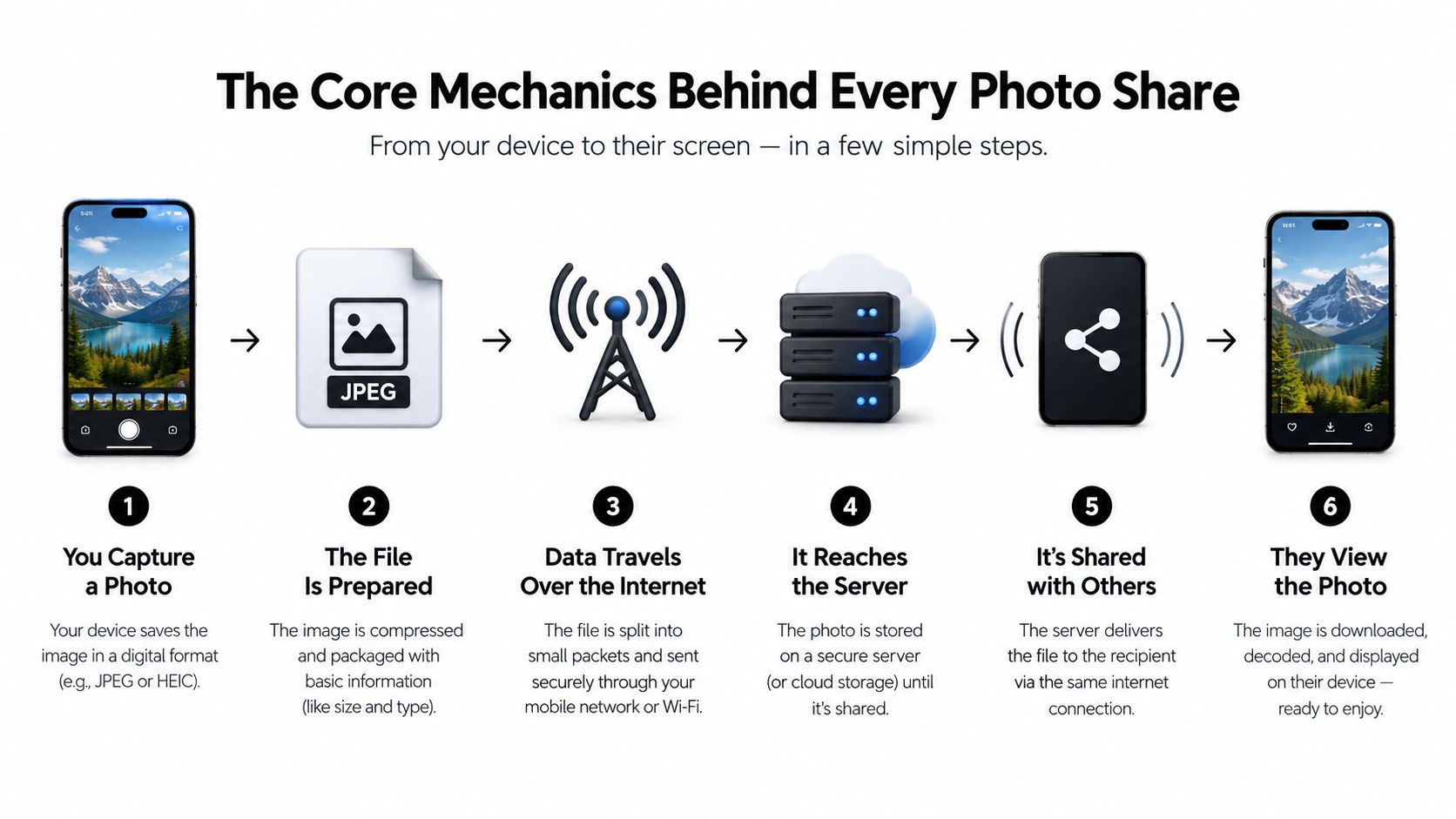
Every method uses the same basic journey, even when the apps look different. A phone captures light and turns it into pixels. Software encodes those pixels into a file. A network carries that file to storage or another device. Then a browser or app renders it so someone else can see it.
Think of it as five steps. Capture, encode, transfer, store, render. If one step is weak, the result suffers. A great capture can look poor after heavy encoding. A clean file can sit useless if transfer fails on weak venue Wi-Fi.
Why phones changed everything
A modern phone combines the camera, the internet connection, and the browser in one device. That's why guests no longer need a separate camera and computer to contribute. In Pew Research Center's 2019 cross-national study of mobile activities, at least half of mobile-phone users had taken photos or videos during the previous year in every surveyed country except India, and at least roughly 30% in every country had posted pictures or videos to social media, reaching 67% in Lebanon and 61% in Jordan.
Device type matters a lot. In Vietnam, 91% of smartphone users had taken photos or videos, compared with 17% of users of basic phones. For an event, that means your collection depends partly on what guests carry. A link or QR code works well when the phone can open a browser and upload. It works poorly when it can't.
Why files get smaller before they travel
Raw image data is large. Sending it untouched would be slow and expensive on storage and bandwidth. So phones usually save photos as JPEG files, a standard introduced in 1992 that uses lossy compression to reduce file size while keeping enough quality for normal viewing, as summarized in the history of the digital camera and JPEG.
Packing a suitcase is a useful analogy. You fold clothes tightly so more fits, and you accept a few creases. JPEG discards some detail your eyes are less likely to notice, especially color detail, so the file travels faster. Fold and refold the same clothes many times, though, and they look tired. Re-encode a photo repeatedly and edges, colors, and fine detail degrade.
Practical rule: keep the uploaded original as the master file, and let smaller previews do the fast browsing work.
Good systems therefore store the original separately and create smaller derivatives for galleries. Your friend sees a quick preview on her phone. You download the original later for printing or editing. That's the core mechanics, whether the front door is a social app, a cloud album, or a private upload page.
The Main Ways People Share Photos Today
Once you see the shared pipeline, the differences between methods become clearer. They don't differ much in how a file moves. They differ in who invites whom, who can see what, and what happens to the original.
Cloud sync services such as iCloud Photos and Google Photos copy photos from a device to online storage automatically. They suit personal libraries and small trusted groups. The catch is account matching. A guest who doesn't use that service may struggle to join, view, or contribute.
Direct transfer and social platforms
Direct transfer moves a file from person to person through AirDrop, Quick Share, Bluetooth, or email. It's handy when two people stand next to each other. It's slow for collecting from a whole room because the organizer must repeat the handoff again and again.
Social platforms such as Instagram, Facebook, and WhatsApp optimize for posting and conversation. They make distribution fast and familiar. They also set their own rules for audience, compression, discovery, and reuse, which may not match a private family or workplace event.
Private upload portals give guests one event-specific place to send files. The organizer controls the page and the resulting collection. Guests usually open a link in a browser rather than joining a social network or matching the organizer's photo service.
Photo Sharing Models at a Glance
| Model | Who Controls Access | Typical Use | Original Quality |
|---|---|---|---|
| Cloud sync | Account owner and invited members | Personal libraries, small families | Often preserved in the owner's library, settings vary |
| Direct transfer | Sender and recipient, one handoff at a time | Two people nearby, email attachments | Can be preserved if the file itself is sent |
| Social platforms | Poster within platform rules | Public posts, group conversations | Commonly resized for feeds and chats |
| Private upload portal | Event organizer | Weddings, parties, conferences, offsites | Designed for organizer download of uploaded originals |
No model wins in every setting. Email can be perfect for sending three photos to your sister. It creaks when eighty guests each send separate messages with large attachments. A social post can delight friends who couldn't attend. It can also expose a child's birthday to a wider audience than the parents wanted.
Ask three questions before you choose. Who must contribute? Who must be able to view? Who should control the files afterward? Your answers point to the model faster than any feature list.
How a Private Upload Portal Works Step by Step
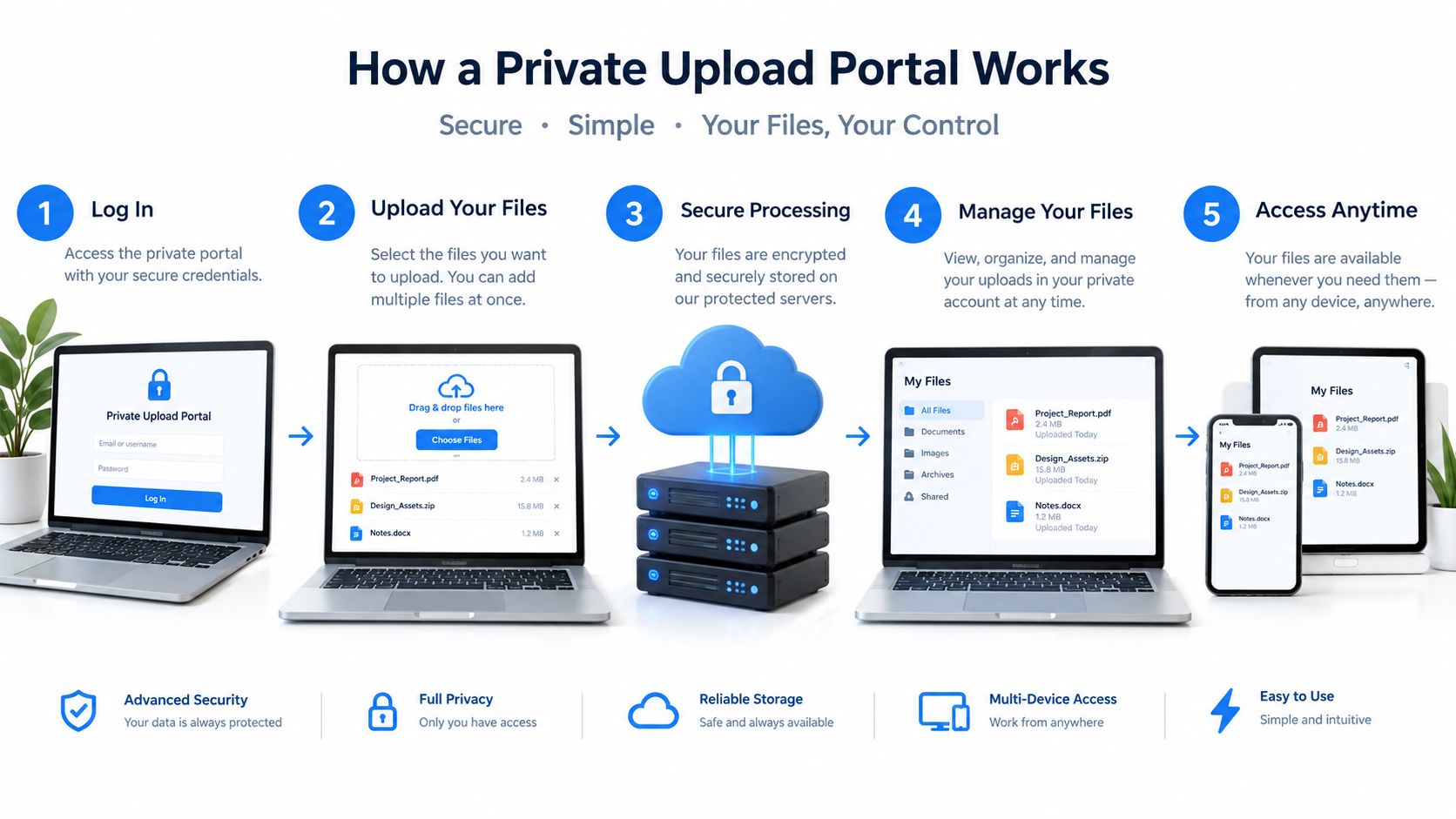
A private upload portal applies the same pipeline to one event. The organizer creates an upload page, shares a link or printable QR code, and guests send photos from their phones. The collection lands in one dashboard instead of scattered chats.
With EventUploader, for example, an organizer sets up a branded page with colors, a logo, and a welcome message, then shares one link or QR code. Guests scan and upload from a phone browser with no app to download and no account to create. The organizer can watch uploads arrive, pause or close uploads, download the event in original quality, and later publish favorites as a gallery on the same link.
What the guest experiences
The guest flow should feel almost boring. Boring is good here.
- Scan or tap. The guest scans a QR code on a table card or taps a link in a message.
- Choose photos. The browser opens an upload page, and the guest picks files from the phone.
- Send. The phone transfers the files to a server over an encrypted web connection.
- Done. The guest doesn't need to organize, rename, or follow up with the host.
Behind that simple flow, the system stores the uploaded file and prepares smaller versions for preview. The technical reason is explained in Rochester's lecture notes on image compression. JPEG converts RGB to Y′CbCr, downsamples color channels, and quantizes image blocks. In 4:2:0 mode, brightness stays at full resolution while each color channel is sampled at half horizontal and vertical resolution, because human vision notices brightness detail more than color detail.
What the organizer controls
The organizer sees a different side. She can review incoming photos during the event, close uploads when the party ends, and download originals for an album or archive. She can also choose favorites to publish back as a gallery, so guests revisit the same link to view the finished set.
That separation matters. Upload access doesn't have to mean public viewing access. Guests can contribute without browsing everyone else's files, and the organizer decides what becomes the shared gallery. The safest setup keeps the original as the archival object and uses derivatives only for browser previews, since aggressive recompression can create block edges, color bleeding, and lost detail.
For a wedding, put the QR code where guests naturally pause, such as tables, the bar, and the welcome sign. For a conference, put it on badges, slides, and the closing screen. The technology is simple. Placement and timing decide whether people use it.
Privacy and Control Who Really Owns the Photos
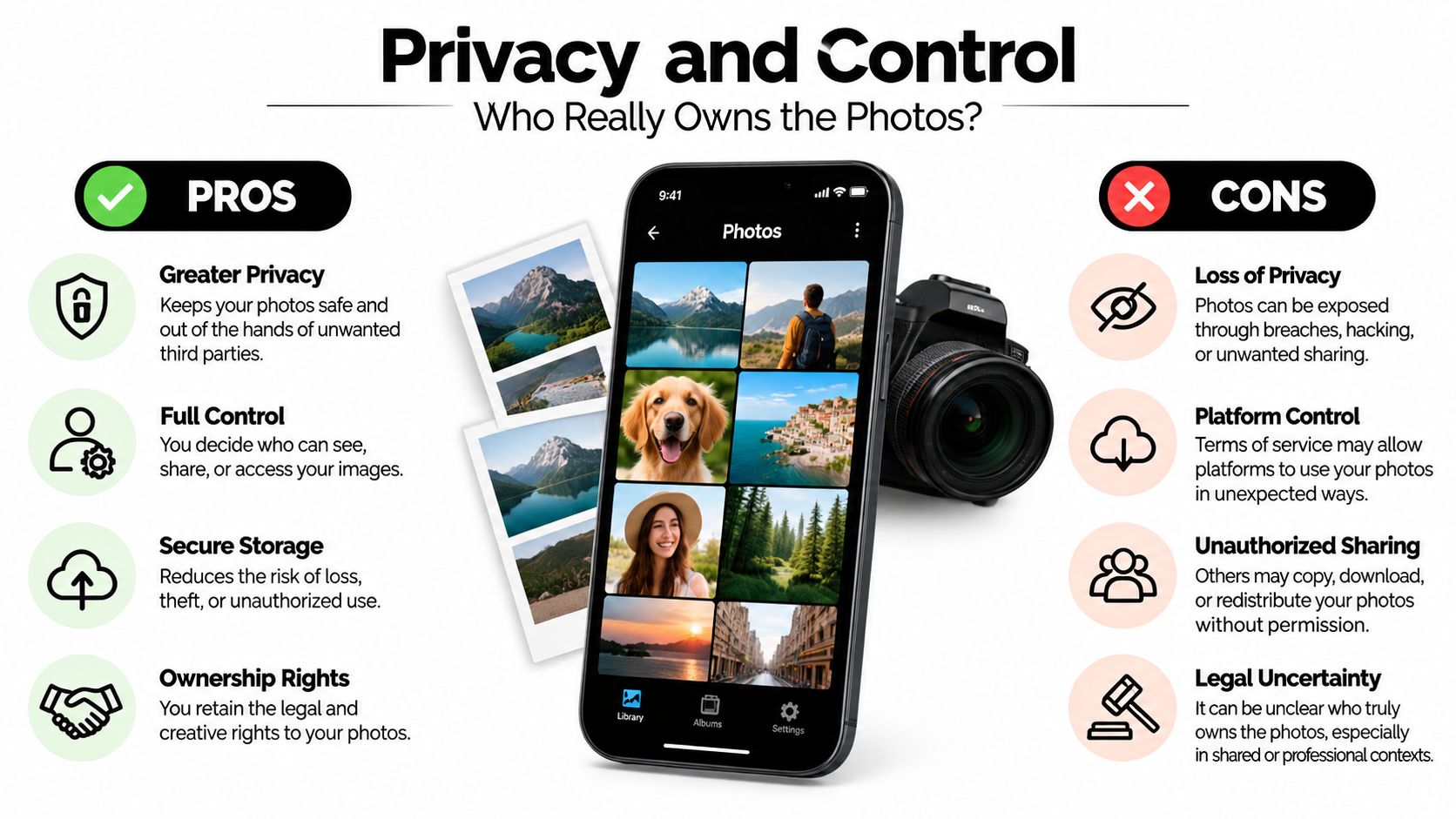
People often use the word shared as if it means private. It doesn't. A photo can be shared with one named person, anyone holding a link, a platform's wider audience, or the public. Those are very different promises.
Research on digital photographic practices found that older adults were often uncertain about where photos went after posting online, preferred named recipients and limited channels, and worried that a private image could become widely visible, as reported in the Visual Studies article on digital photographic practices. That uncertainty is reasonable. The uploader may not be the only person in the photo, and other people may have different comfort levels.
Three kinds of control
Recipient-controlled sharing means you send a photo to named people through a limited channel. Email to your parents fits here. You choose the audience, though recipients can still save and forward the file.
Public discovery means people beyond your intended audience can find the photo through search, tags, recommendations, or resharing. A public social post fits here. It's useful for performers and businesses that want reach. It's risky for school events and private parties.
Platform-controlled reuse is the part many guests miss. When you upload to a service, its terms may govern storage, display, analysis, and other uses. Concern is widespread. A 2025 industry analysis cited survey findings that 81% of social-media users were concerned about privacy and 90% worried about platforms monetizing their data. You don't need to panic about every upload. You do need to read the control settings before the event, not after photos spread.
Questions to settle before guests upload
- Can access be revoked? Decide whether the organizer can close uploads, unpublish a gallery, or change the link.
- Does the link work for anyone? If yes, treat it like a key and share it only with intended guests.
- Are downloads allowed? Viewing and downloading are different permissions, and guests should know which one applies.
- What happens after the event? Set a retention plan for keeping, exporting, and deleting files.
- Who gave consent? Ask before publishing identifiable people, especially children, in a wider gallery.
If you want a deeper look at organizer controlled viewing, read about setting up a private photo gallery for an event. The main lesson is simple. Convenience isn't the same as privacy. A method can be easy for uploaders and still be wrong for the people pictured.
Why Some Guests Get Left Out of Sharing
Many guides assume every guest can install an app, create an account, remember a password, and understand sharing permissions. Real events don't look like that. A wedding includes grandparents, teenagers, coworkers, and a friend using an older phone with a cracked screen.
In a study of retirees and digital photographic practices, email was the most popular method among those who shared digital photos, while several participants avoided Facebook because they lacked confidence that posted images would remain private. Broader accessibility research identifies visual impairments, limited digital literacy, dense interfaces, complex navigation, and privacy uncertainty as recurring barriers for older adults.

Friction hides in small steps
Each extra step filters people out. An app download needs storage space and a store password. An account needs an email address and verification. A dense gallery needs good eyesight, steady tapping, and confidence that a wrong tap won't post something publicly.
Weak connectivity adds another filter. A rural venue, a packed festival, or a basement party room can slow uploads. Guests on limited mobile data may postpone sending large videos, then forget. A browser based page helps because it removes installation and sign up, but it still needs readable text, clear buttons, and a forgiving flow when a connection drops.
A sharing method is only easy if your least confident guest can finish it without asking for rescue.
Design for the whole guest list
Test the flow with the people you're worried about, not with your most technical friend. Ask a grandparent to scan the code and upload one photo while you watch. Note where she hesitates. Fix the sign, enlarge the code, or add one plain sentence such as, Tap the link, choose photos, press upload.
Offer a backup path too. Some relatives will still prefer email, and that's fine. Others may hand their phone to a trusted helper at the event. For family occasions with several generations involved, these family picture sharing approaches can help you plan around mixed confidence levels.
Accessibility decides whose memories enter the collection. If only confident smartphone users contribute, you'll miss the aunt who caught the quiet moment before the ceremony and the grandfather who filmed the song. Inclusion isn't a polish step. It's how the archive becomes complete.
Choosing the Right Sharing Method for Your Event
Start with the event, not the tool. A dinner for six can use direct transfer or a chat because the handoffs are few. A wedding, school celebration, festival, or offsite needs one destination that many people can reach quickly.
Use four checks. Audience tells you whether accounts and apps are realistic. Control tells you whether a public platform is appropriate. Quality tells you whether you need downloadable originals for print, press, or archives. Afterlife tells you who keeps the files, who can remove them, and when the gallery closes.
A simple way to decide
- Small and trusted points to cloud sync, email, or direct transfer.
- Public and promotional points to social platforms, with consent handled upfront.
- Many contributors and one organizer points to a private upload portal.
- Mixed ages and devices points to the option with the fewest steps in a browser.
Whatever you choose, tell guests before they start taking photos. Put the instructions where they'll see them during the event. Say who will receive the photos, whether a gallery will be published, and how guests can opt out of being pictured.
That's the full answer to how photo sharing works. A phone captures and encodes a file, a network moves it, storage holds it, and software shows it. Your job as organizer is to choose the front door, set the rules, and make sure every guest can walk through it.
Ready to collect every guest photo without chasing group chats or asking anyone to install an app? EventUploader lets you create a branded upload page, share one link or QR code, and download originals or publish a finished gallery on that same link. Set up your page before your next wedding, birthday, offsite, or festival and watch the memories arrive in one place.