7 Photo Sharing Examples for Every Kind of Celebration
Explore 7 real photo sharing examples for weddings, birthdays, corporate events, and community gatherings — plus the tactics that make each one work.

The reception ends at 1 a.m., and by Tuesday the photos are spread across four group chats, two phones belonging to cousins you've met twice, and one story that expired before the cake was cut. Half the night never made it home. Corporate events finish the same way, with a recap deck built on three blurry shots because nobody owned the collection.
Capture isn't the problem. Phototrend's write-up of Photutorial's estimates projects 2.1 trillion photos taken worldwide in 2025, up from 1.94 trillion in 2024. Collection is the problem.
The seven photo sharing examples below each fix one version of it, from a wedding weekend spread across three venues to a Saturday morning football match. Every entry names the tool, the setup step that does the heavy lifting, and the tactic you can copy with a different product. If part of your audience is remote, run the gallery alongside your virtual event engagement solutions so the stream audience uploads too.
Table of Contents
- 1. EventUploader
- 2. GUESTPIX
- 3. Kululu
- 4. GuestCam
- 5. POV
- 6. Wedibox
- 7. WedUploader
- Event Photo Sharing Tools at a Glance
- Choose the Example That Matches Your Event, Then Copy the Setup
1. EventUploader
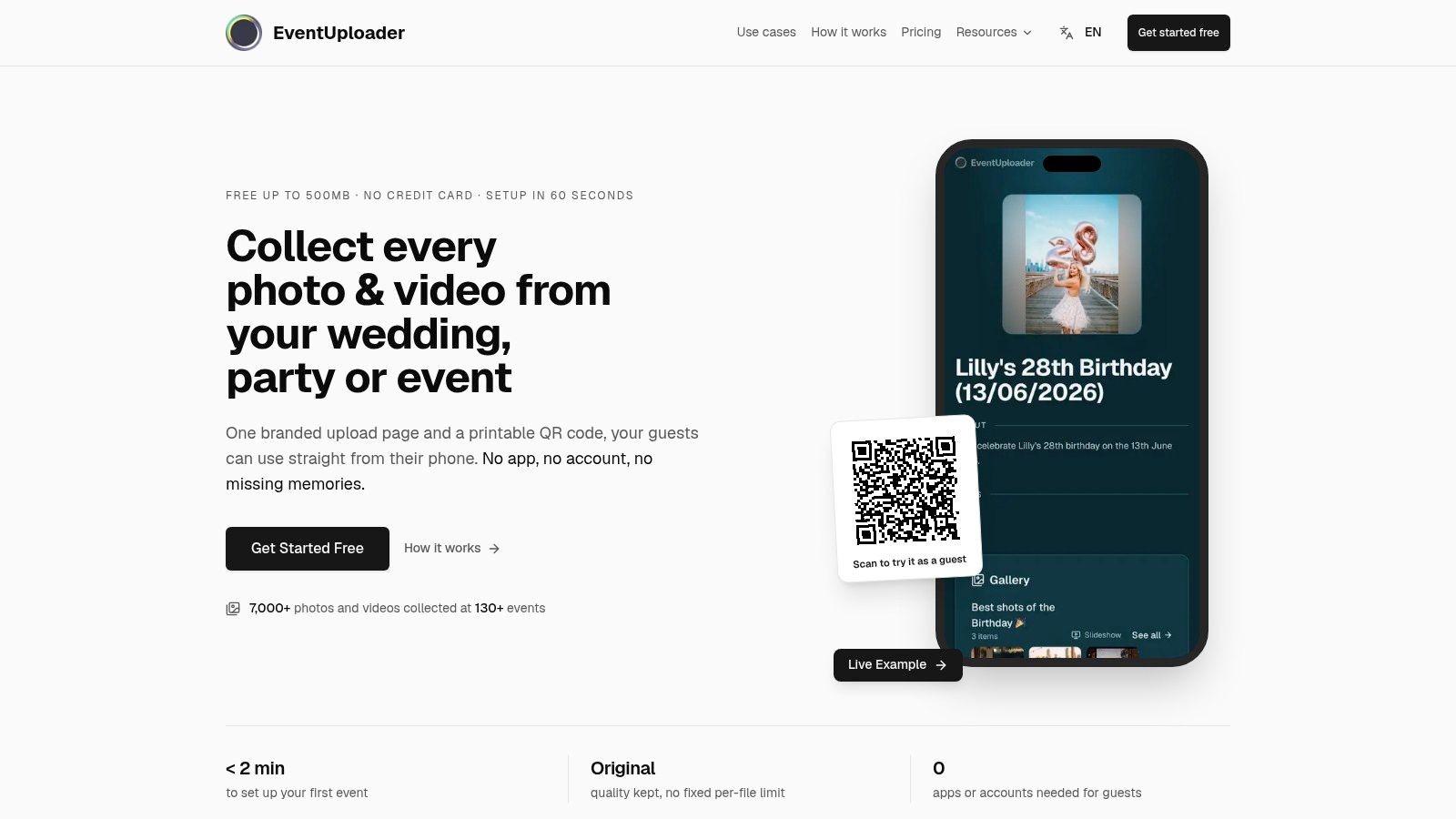
For a wedding reception, put the QR code where guests are already looking: on the table card beside the menu. Add a short announcement before the first dance so guests know where to send their photos. The same setup works for a conference: place the code near the entrance and on session signage, then use the collection in the recap.
What the organizer actually controls
EventUploader gathers photos and videos from event attendees into one gallery owned by the organizer. Guests upload from their phones using the event's unique link or printable QR code. They don't need to download an app or create an account.
Uploads appear in the organizer's dashboard as they arrive, with previews and the name of the person who sent each file. Set the event to accept photos, videos, or both. Supported formats include JPEG, PNG, HEIC, GIF, WebP, MP4, MOV, AVI, and MPEG.
After collecting uploads, select photos and videos to publish as an album on the same page guests used to upload. Publishing turns that page into a shared gallery for anyone with the link; keep the album as a draft visible only to the organizer, or unpublish it later. Add names to photos and videos so guests can search for tagged items, or play a published album as a full-screen slideshow on a TV or projector.
The Free plan does not include a public gallery or shareable albums. Those features are included in the One Timer, Light, and Pro plans. One Timer also includes a 30-day upload window, no watermark, QR code generation, and a custom branded page.
Pros
- One link or QR code for uploads: guests send photos and videos directly from their phones.
- Live dashboard: review incoming files and who sent them as they arrive.
- Curated albums on the upload page: publish selected media for guests to view, or keep it as a draft.
- Full-screen slideshow: display a published album on a TV or projector.
Cons
- Public galleries and shareable albums are not on the Free plan.
- The organizer controls publishing: guests can view a published album if they have the link, so keep it as a draft if it should remain private.
Website: EventUploader
2. GUESTPIX
At a wedding weekend, Friday's welcome drinks, the rehearsal dinner, and Saturday's reception can all feed one collection. Put the same guest-facing QR code on each event's signage so guests don't have to learn a new upload flow or hunt for another album.
GUESTPIX lets guests upload photos and videos through a link or QR code in their browser, without installing an app. Paid packages can combine invitations, RSVP, guestbook entries, slideshow settings, and custom colors and fonts with the photo collection. A multi-event package can cover the engagement party, rehearsal dinner, and wedding.
The tactic worth copying
Start collecting at welcome drinks. Guests who scan the code on Friday know how to use it by the reception, and the collection can include moments from before the ceremony.
Pros
- One package for several events suits a wedding weekend with multiple gatherings.
- Guestbook and invitation features give guests reasons to return to the page.
- A free starter option lets you try the upload flow with capped uploads.
Cons
- The free option has upload limits, so check whether its cap fits the size of your event.
- Longer upload windows, more customization, and multiple galleries are paid features. Unlimited guest access is subject to a fair-use policy.
For a closer comparison with other services, read this GUESTPIX alternatives breakdown.
Website: GUESTPIX
3. Kululu
Capture volume and distribution are rarely the same number. Outsnapped's Money20/20 case study records a four-day conference activation converting 396 participant sessions into 1,968 photo outputs, nearly five pieces per session, while only 373 shares or views were logged. Production beat distribution by a wide margin.
That gap is the argument for a live wall. Kululu handles guest uploads through a link or QR code and pushes contributions onto a projector or screen while the event is still running, which turns a growing pile of unused photos into something the room reacts to. Guests can send photos, videos, captions, and text posts, and organizers can moderate what appears.
A live wall works in the hour before dinner and the hour after the awards. During a keynote it competes with the speaker and gets switched off.
Where this fits best
Company all-hands, conferences, product launches, and awards nights, where the screen already exists and the content would otherwise sit in a folder until the recap email. For a private family party, the wall is optional and the moderation is the key feature.
Pros
- Live slideshow or photo wall makes sharing part of the event itself.
- Works for both corporate and personal events, with captions and text posts alongside media.
- A free plan lets you test the experience before committing.
Cons
- Free-plan limits apply to uploads, customization, and event duration.
- Unlimited plans carry a fair-use ceiling of 10,000 media uploads and 5,000 participants per event, so check the window against your schedule.
Website: Kululu
4. GuestCam
At a conference, attendees may download event photos far more often than they share them publicly. At SHRM23, more than 130 attendees created personalized Snapshot content, 75% downloaded it, and 22% shared it directly to social media through the built-in feature, according to Snapbar's SHRM23 case study. A separate headshot workflow drew over 125 participants and produced more than 1,000 edited headshots, roughly eight per person.
Make retrieval the first job. Give attendees a clear way to get their files, then treat social sharing as an optional next step.
GuestCam focuses on access to collected media, with original-quality photos and videos, one-click ZIP export, batch downloads, live slideshows, reactions, comments, and multilingual guest pages. Its plans use one-time pricing, with different features and upload windows by tier.
The multiple-gallery trick
Premium supports several main galleries, each with its own QR code and link. For a tournament weekend, use separate galleries for each day or activity. For a wedding with a Friday dinner and Saturday reception, give each gathering its own link. Sorting starts at upload rather than becoming a cleanup task later.
Pros
- No per-guest fees on the listed plans, and guests need neither an app nor an account.
- Original-quality batch downloads with a single ZIP, useful for photographers and family archivists.
- Separate galleries with separate QR codes on the Premium tier.
Cons
- No free plan is listed.
- Standard has a shorter upload window than Premium, and upload and storage windows start on the event date.
- Custom logos and guest-portal colors require contacting GuestCam for pricing.
Website: GuestCam
5. POV
A wedding reception can produce plenty of posed photos and still miss the candid moments guests would have taken themselves. POV turns photo-taking into part of the event: guests join by QR code or link, then take pictures through the experience using a limit set by the host. Guests can also upload from their camera roll if that option is enabled. iOS guests get an App Clip; Android guests use the web experience.
A practical starting point for a disposable-camera-style night is a limit of around 24 shots. Announce it before guests start so they can pace their pictures and treat each shot as a choice.
Why it works on younger crowds
For birthdays, hen parties, festivals, and student nights, taking photos can be part of the entertainment rather than a chore afterward. The camera experience also keeps guests from having to search through their camera rolls for event pictures.
Pros
- Photo-taking becomes the activity, so guests make pictures during the event.
- Host review and deletion controls let the organizer remove images before sharing.
- A free option for events up to 10 guests, with pricing that scales by guest count.
Cons
- An internet connection is required. Check venue connectivity before the event.
- Host setup for personal events is app-based.
- Per-event cost rises with guest count, so check the calculator before inviting a larger group.
For a different approach to event galleries, browse these Instagram-style sites for sharing event photos.
Website: POV
6. Wedibox
Privacy is the reason part of your guest list never uploads. A 2025 study of 454 mobile respondents found that 22% to 32% shared private information in photos despite being explicitly asked not to, and that 39.2% of people who hadn't shared images cited privacy concerns as the main reason. If your only collection method is a public hashtag, a slice of the room opts out.
Wedibox answers that with a closed gallery instead of a feed. Guests upload through a QR code or link with no app, downloads come at full quality, and the listed paid embed offer supports unlimited photos and videos. A free tier allows up to 50 uploads, a $29 one-time embed plan carries a three-month upload window, and a $49 plan extends that to 12 months.
The embed advantage
The embed drops photo sharing into the wedding website the couple already built, so guests find the schedule, the travel notes, and the upload button in one place. It supports multiple languages, which helps when half the family is flying in from abroad and reading a page in their second language.
Tell guests what happens to the photos. One line on the invitation, "These go to a private gallery the couple controls," removes more hesitation than any extra feature.
Pros
- Photo sharing sits inside the existing wedding site, so there's no second destination to explain.
- Full-quality downloads and unlimited media on the listed paid embed offer.
- A free tier with up to 50 uploads for a small dinner or engagement party.
Cons
- The embed product assumes you already have a website.
- The free tier caps at 50 uploads.
- The $29 embed plan closes uploads after three months.
Website: Wedibox
7. WedUploader
At a family-heavy wedding, upload volume is rarely the bottleneck. The harder problem is whether older guests can send anything at all. Research on older adults and social technology finds people with device access may still avoid social platforms because of skill barriers, and sharing often runs one way, with older relatives more likely to receive photos than post their own, in Cambridge University Press research on older adults' social technology use.
WedUploader suits the family archivist setup: guest photos and videos go straight into the host's Google Drive. Premium adds a shared gallery, a private guestbook, QR-code templates, event information, and a fullscreen slideshow with control over which images appear.
The Drive trade-off
Drive storage helps when the couple already wants originals inside their own Google account. It hurts when a grandmother taps the gallery and meets a sign-in wall. Test the viewing path on an older relative's phone before the event, then put the clearest instruction on the table card.
Pros
- Files land in the host's own Drive account, so nothing is trapped in a vendor dashboard.
- Premium adds the hosted pieces around the Drive destination, including gallery, guestbook, QR templates, and slideshow controls.
- Album rules are plan-dependent, so confirm the setup before inviting a big room.
Cons
- Storage depends on the host's Google Drive capacity and limits.
- The basic experience is less of a branded, hosted gallery.
- Regional pricing and included features should be confirmed at checkout.
If you're building the rest of the flow, these wedding photo sharing ideas cover the signage and timing that make a QR code work.
Website: WedUploader
Event Photo Sharing Tools at a Glance
Seven tools, three decisions: how guests get files in, what the organizer pays, and who the gallery serves afterward. Scan the rows for your event's shape first, then confirm the figures on each tool's pricing page.
| Tool | Guest Access Method | Free Plan | Starting Price | Best For |
|---|---|---|---|---|
| EventUploader | Browser upload via link or QR code; no app or account required | 500MB | €12/month or €25 one-time | Branded event photo collection with galleries and slideshows |
| GUESTPIX | Browser uploads via link or QR code; no app required | Up to 50 photos | $49 one-time | Weddings and celebrations needing invitations, RSVPs, or guestbooks |
| Kululu | Browser uploads via link or QR code; no app or account required | Available; limits apply | $39 Plus | Events with a live photo wall or slideshow |
| GuestCam | Browser access via link or QR code; no app or account required | No free plan listed | $49 one-time | Original-quality downloads and batch exports |
| POV | Join via QR code or link; iOS App Clip or Android web experience | Up to 10 guests | Per-event pricing based on guest count | Participatory, disposable-camera-style event photos |
| Wedibox | Upload via QR code or link; no app required | Up to 50 uploads | $29 one-time | Wedding photo sharing embedded in an existing website |
| WedUploader | Guest access via event page and QR-code materials | Free tier; premium adds a gallery, guestbook, and slideshow | Paid premium upgrade | Sending guest uploads directly to the host's Google Drive |
The middle column is the main filter. A free plan capped at 50 photos covers a dinner party, not a festival, and a one-time fee suits a single wedding while a monthly plan pays off across a season of events.
Choose the Example That Matches Your Event, Then Copy the Setup
Seven tools, one pattern: a single link or QR code, no login step for guests, and a gallery the organizer owns at the end. Any tool that breaks one of those three rules loses uploads, and no amount of signage on the tables fixes a sign-in screen.
Social reach is not the bottleneck. Eurostat figures cited in a 2025 roundup of photo sharing statistics put social network use at 67.3% of people aged 16 to 74 in the European Union in the previous three months. Your guests are already holding phones. A feed broadcasts; it does not collect, so the tool you pick has to gather everything into one place.
Pick by event shape, not by feature list:
- One celebration, tight budget: Wedibox or GUESTPIX on the free tier, then upgrade only if the upload count demands it. A wedding with a QR card on each table can run its whole collection before you spend anything.
- A calendar of events: a monthly plan beats buying a one-time package four times a year. Recurring conferences, club seasons, and agency work all land in this bucket.
- A screen in the room: Kululu or EventUploader for a live slideshow, because photos nobody sees during the party are photos nobody remembers.
- A family archivist: WedUploader if Google Drive is already the household system of record.
- A privacy-first guest list: a closed gallery beats a public hashtag every time, especially with children in frame.
- A crowd that needs entertaining: POV turns the camera into the activity.
The celebrations that produce the best albums are the ones where the host made contributing easier than not contributing. If you're planning a graduation party, these graduation party themes and outfit ideas pair well with a QR code on the dessert table.
Readers who want the simplest version of the QR-code workflow can start free with EventUploader: a branded upload page, printable QR code, and live dashboard set up in minutes, with paid plans adding shareable albums, and name tagging and TV-ready slideshows also available to organizers.
The photos from your next event are already being taken. The only question is whether they end up in a gallery you own or scattered across group chats by Sunday night. EventUploader gives you one branded upload page, one printable QR code, and no app for guests to download, with a live dashboard so you can watch the collection fill up and publish the best of it back to the same link. Start free, run the wedding table test at your next party, and see how much of the night you get to keep.