Wedding Guest Photo Upload Site: How to Set One Up
Learn how to set up a wedding guest photo upload site, share a QR code or link, and collect every guest photo in one private gallery.
You're looking through the morning-after messages, and someone mentions a brilliant dance-floor photo you haven't seen. Your cousin has it, or perhaps it's in the family chat. Meanwhile, you're still trying to find the picture of your grandparents laughing together at dinner.
A wedding guest photo upload site gives those pictures a destination. But the page alone isn't the plan. You also need a readable printed link, someone who can help guests, sensible privacy settings, and a way to return the finished gallery without leaving everyone's files online indefinitely.
Table of Contents
- Why Guest Photos Never Reach the Couple
- Which Collection Method Fits Your Wedding
- Privacy Choices Before You Open Uploads
- How to Set Up the Upload Page and Share It
- Help Every Guest Upload Without an App
- Download the Gallery and Hand It Back
Why Guest Photos Never Reach the Couple
Say you wake up after your reception with a few selfies, some tagged posts, and messages promising to send more. Your photographer will deliver their edited work later, but the table jokes, bathroom mirror portraits, and late-night reunions are scattered across guests' phones.
A wedding guest photo upload site is a dedicated page where guests open a link in their phone browser, select photos or videos, and send them into a collection the couple controls. It gives people a specific action instead of the vague request to send pictures sometime.
In 2024, 46% of UK respondents planned to use a wedding website or hashtag to gather guests' photos, according to research commissioned by HONOR and conducted by Censuswide among more than 10,000 consumers across five European markets. That's an intention to collect, not evidence that every wanted photograph reaches the couple.
The missing piece is the handoff
Guests can take wonderful pictures without knowing where to send them. A bridesmaid might assume you've already saved her story. An uncle might wait until he's sorted his camera roll, then forget which sharing method you mentioned.
The collection problem looks like this:
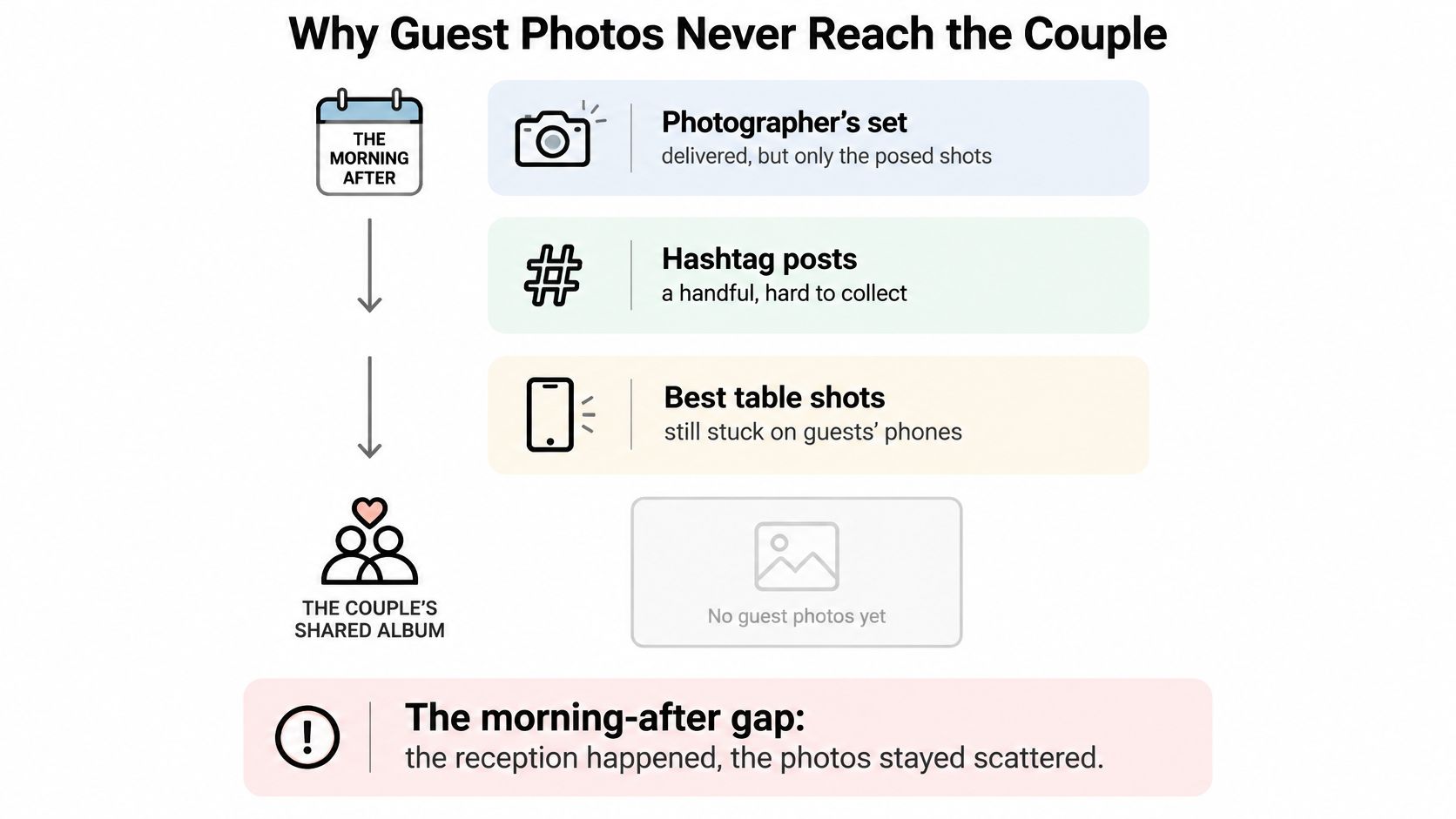
Your photographer's work remains a separate, essential collection. Professional coverage isn't limited to posed portraits, and guest uploads shouldn't be treated as a substitute for an agreed photography brief. They add viewpoints the photographer may not have been standing beside.
Practical rule: Choose one destination for guest files, even if people discover it through several different routes.
Give that destination a recognizable name, explain what belongs there, and keep the invitation available after the reception. Don't make guests decide between sending a direct message, tagging a post, and joining another album.
The useful question isn't whether your guests will take photos. It's whether someone holding a photo you'd treasure can understand how to hand it over, without asking you for technical help during your wedding.
Which Collection Method Fits Your Wedding
At the reception, one guest scans a sign, another asks where to send a video, and a third shares photos in a chat. A dedicated upload page gives everyone one place to contribute, while other methods can serve as useful extras. Choose for the task guests need to complete, not just the appearance of a sample gallery. Consider whether they can contribute without recovering a password, whether you can retrieve the original files, and who controls access after the celebration.
Ways to collect wedding guest photos
| Method | Guest friction | Who owns the files | Usual failure | Use it when |
|---|---|---|---|---|
| Dedicated upload site | Browser link or QR code, with no guest account on a no-account service | Couple or host controls the collection; contributors retain their rights | Guests miss the invitation or can't scan | You need one archive for a mixed-age list |
| Shared cloud album | May require an app or account | Contributors retain rights; album creator manages access | An unfamiliar login stops participation | A small group already uses the same cloud service |
| Wedding hashtag | Guests must publish and spell the tag correctly | Contributors retain rights, subject to platform terms | Private posts and misspelled tags escape collection | You want public sharing alongside your archive |
| Group chat | Guests must join and find the right thread | Contributors retain rights; copies sit across participants' devices | Videos bury stills, and sending settings may reduce quality | A close-knit group already shares a chat |
| Disposable cameras | No phone or login needed | Couple receives the developed photographs and negatives | Developing costs, delays, and limited exposures | You want a tactile activity or a phone-free moment |
Album control and copyright ownership are separate. A platform hosting an image doesn't automatically become its copyright owner, and receiving a guest's file doesn't automatically give you unrestricted permission to publish it.
Give each extra method a purpose
A shared cloud album can suit family members who already use that service. Check contribution access with someone outside the organizer's account before choosing it. Viewing an album doesn't necessarily mean a guest can add files.
A hashtag works for friends who enjoy posting publicly, while a chat can suit a small group that already shares one. Disposable cameras offer a tactile activity or a phone-free moment, but someone still needs to collect them and arrange processing.
For a church celebration, keep guest collection separate from professional ceremony coverage. A guest upload page gathers candid files; choosing a photographer for a religious setting is a different decision. This guide to compare baptism photographers in Sydney addresses that separate choice.
For the reception, use these wedding photo-sharing ideas to select extras that fit your guests. Keep one system of record, the place where you'll download and organize the files, rather than asking everyone to remember several destinations. A QR-only page can still leave guests stranded if they can't scan it, the page loads slowly, or it demands more identity information than needed. Pair the page with a printed URL and a human helper who can point guests to it.
Privacy Choices Before You Open Uploads
Start with the fields you refuse to require: email address, phone number, date of birth, and social login. You're collecting wedding memories, not building a contact database. An optional first name or nickname and caption should be enough for a straightforward contribution.
The NIST guide to protecting personally identifiable information recommends minimizing the collection, use, and retention of personal information to what's necessary for the purpose. Its reasoning applies neatly here: storing less unnecessary identity information limits what could be exposed.
EventUploader isn't a social network. Guests aren't asked to sign up for anything; they open a link, pick their photos, and leave.
Separate uploading from permission to publish
A private collection and a gallery shared with guests are different things. Tell contributors whether only the organizers can initially see submissions, and review photographs before making a selection available more widely.
Set a family rule in plain language. Ask guests to skip embarrassing pictures, avoid sharing photographs of other people's children without permission, and contact the organizer if they want a submission removed. Your hired photographer's contract remains separate from these guest candids.
Receiving a photograph is not a blanket invitation to post it publicly.
Privacy language should also explain how someone can make a choice. Cedar & Lily Clothier's page about how to limit sharing of personal information is a useful prompt to make preferences actionable rather than burying them in a general promise. For a wedding, provide a named contact and a clear removal route.
Decide who can access files and when storage ends
Keep administrative downloading and deletion with the organizer and any explicitly appointed co-organizer. Don't distribute dashboard credentials to everyone helping with the reception. For the distinction between collecting privately and publishing selectively, use this guide to a private photo gallery.
Your policy should cover:
- Access: Who can upload, who can browse, and who can manage files.
- Retention: When you'll export the collection, stop contributions, and remove the hosted copies.
- Removal requests: Who guests should contact and how you'll handle a photograph they don't want circulated.
- Technical safeguards: Require encrypted transfer, protected storage, file validation, and malware screening rather than trusting a filename's extension.
Keeping originals while generating smaller browsing previews is sensible technical practice. So is checking actual file signatures, limiting upload sizes, and logging administrative actions. The couple's responsibility is to establish the policy, not to engineer the storage system.
Finish your website notice with wording you can maintain:
Please upload your wedding photos and short clips, avoiding anything others wouldn't want shared.
No account is required; adding your name is optional.
Uploads close on the date shown on this page, and hosted files will be removed after we've exported and reviewed them.
Replace that general timing with your chosen calendar dates before publishing.
How to Set Up the Upload Page and Share It
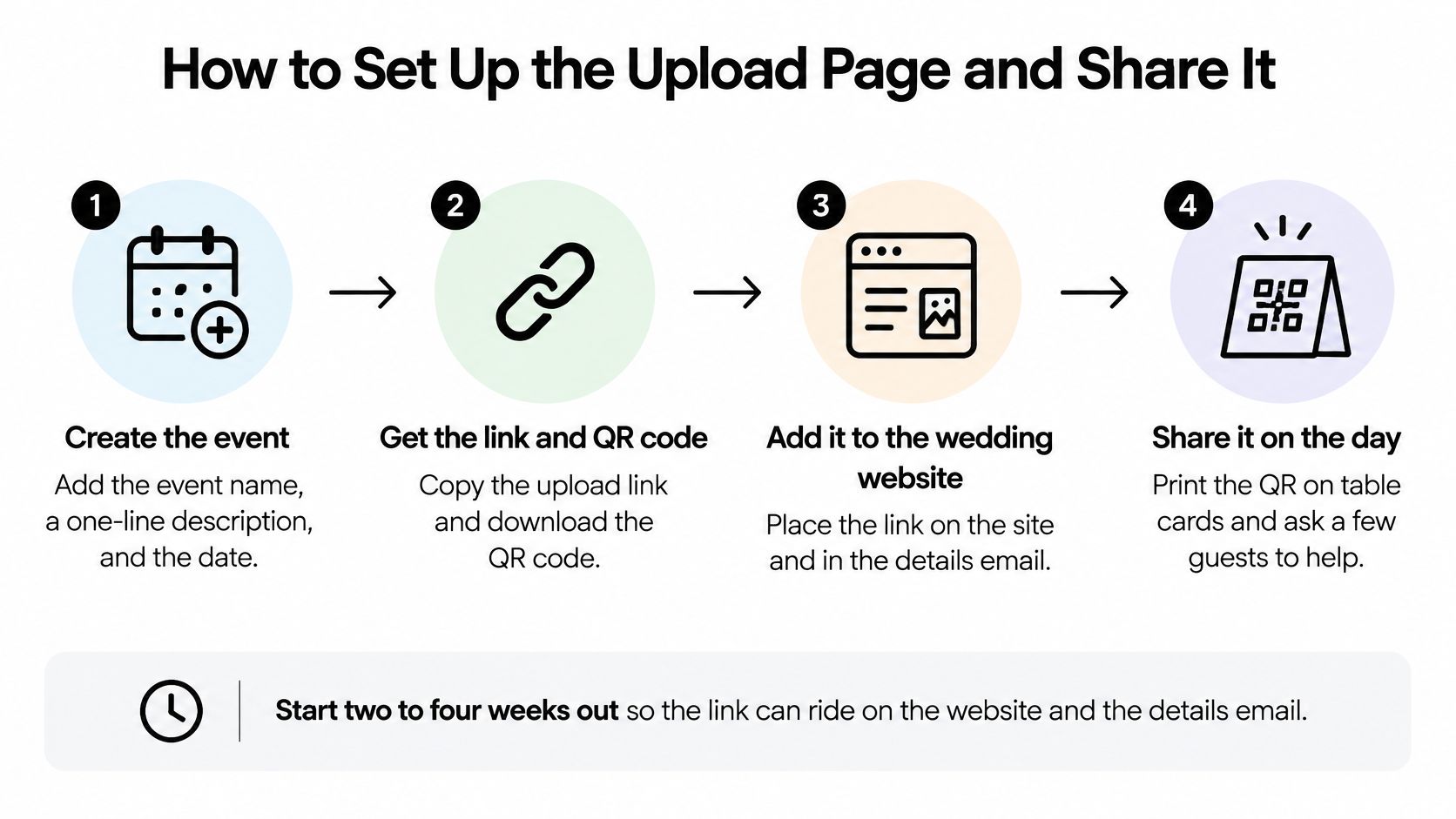
Build and test the page before your final guest-information message goes out. That leaves room to correct a confusing event name, adjust card typography, and test a real upload instead of discovering a problem beside the guest book.
The underlying workflow is create, share, then manage and download. These are separate jobs: building a page doesn't tell guests it exists, and collecting files doesn't preserve them beyond the hosting period.
The setup sequence is straightforward:
Build the page around a clear request
Create a recognizable event. Enter the event name, a short description, and a welcome message. We use the name to create the unique upload link, which you can change later. Choose something guests will recognize when they reopen it at home, such as the couple's names and “Wedding Photos,” rather than an internal planning nickname.
Choose what guests may submit: photos, videos, or both. Our organizers can set that choice. Make the welcome sentence match it: Please share your table photos, speech reactions, and short dance-floor clips. If you don't want full-length recordings, say so plainly rather than assuming “video” means the same thing to every guest.
Apply your access and timing decisions. Test the contribution page while signed out of the organizer account. Confirm that a guest can reach the file picker without entering unnecessary personal information, and place the closing date where contributors will see it. Keep upload availability distinct from whether a finished album is visible.
Add your colors, monogram, and a short prompt. Aim for recognition, not a miniature wedding website. Tables, speeches, and the dance floor tells guests more than Capture the magic. Keep the upload control prominent and leave decorative material below the essential action.
Share something guests can actually use
Generate the QR code and prepare the cards. Attendees can upload straight from their phones using the unique link or code you share. Put the human-readable address described below beside the code, then use this card line: Scan or type the link. No app and no account. Add the invitation to your wedding website and details email as well as printed cards.
Before ordering matching stationery, compare bespoke invitation print options from KLM Design & Prints LTD to think through card format and readability. Keep decorative flourishes away from the QR code, maintain strong contrast, and approve a physical proof after testing it with a phone.
Assign on-the-day management. Choose an organizer or helper to monitor incoming files rather than making the couple check a dashboard throughout dinner. We provide real-time upload control, including the ability to pause or close contributions. If you want an unplugged ceremony, communicate that directly; pausing a page won't stop someone taking photographs.
Download before deleting. Make a trial contribution, retrieve it, and open the downloaded file before the wedding. This checks the whole route rather than just proving the landing page looks attractive. Leave the final upload window consistent with the date you've promised guests, including those contributing after they get home.
Don't fill every surface with instructions. Put cards where people naturally pause, such as the guest book and reception tables, and ask the host or MC to mention the collection at an appropriate break. Guests need a clear invitation, not repeated announcements interrupting the celebration.
Help Every Guest Upload Without an App
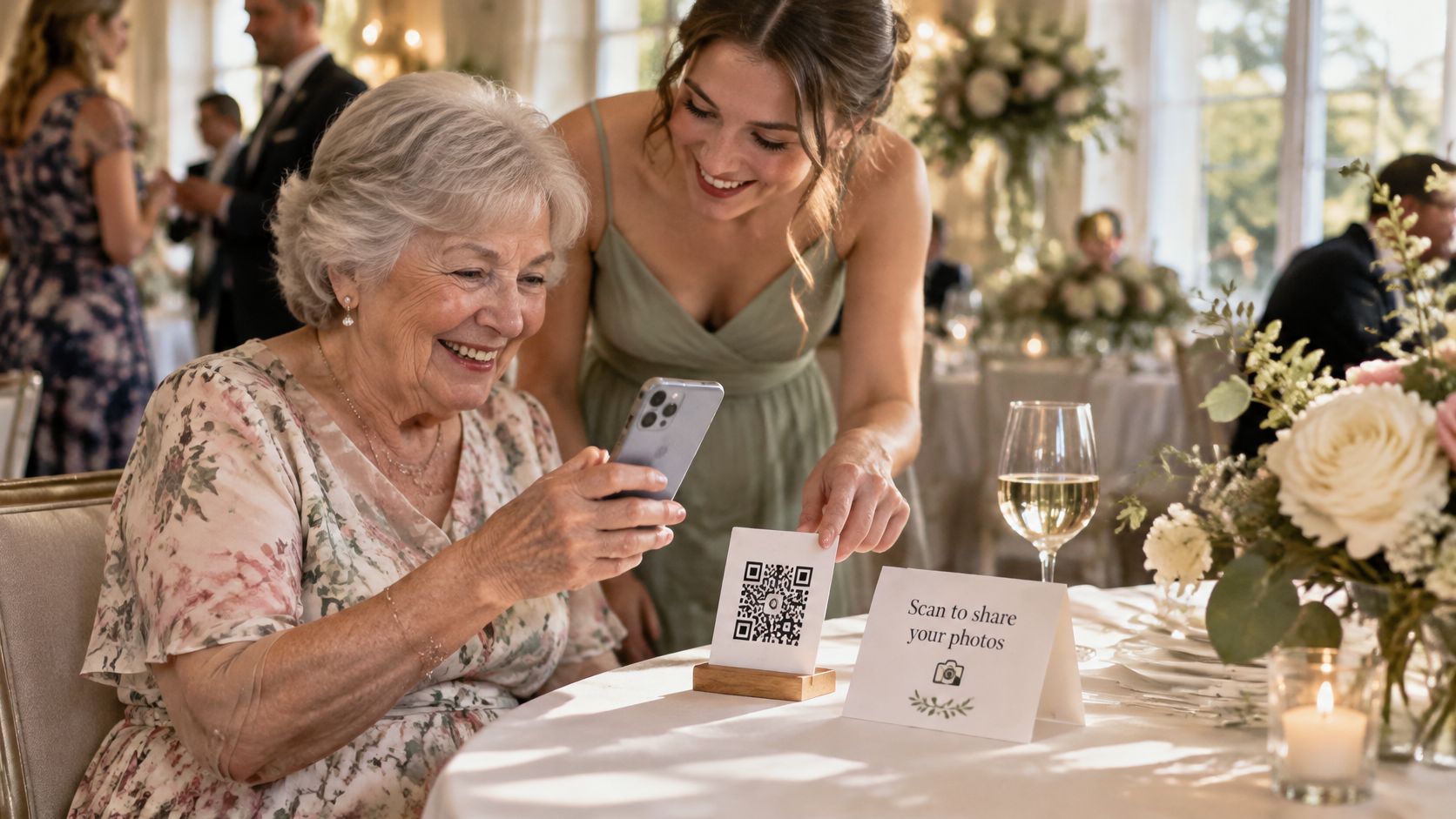
A grandparent may take plenty of photos and still hesitate when asked to scan a code. A browser upload page removes the need to install an app, but QR-only access can still leave guests out. Pair the code with a printed web address and a person ready to help. Keep the guest's phone in their hands so they choose what to share.
Print the address and name an upload buddy
Print the actual upload address in large, readable type beside every QR code. Use the event link guests already have, and test it before printing. Make sure the letters are easy to distinguish and that the address can be typed without accidentally including nearby punctuation.
Ask a sibling, planner, or other helper to stay near the guest-book table. A simple invitation works:
Open the link and I'll talk you through it. You choose which photos to send, and you keep your phone.
Add a short instruction beneath the address: Open the link, tap upload, choose your photos, and send. If guests use different languages, provide translated instructions and ask a fluent speaker to check that they match the page.
Guests may also want to contribute later from a laptop. Someone with a camera may need to transfer files first; someone else may have limited mobile data, a low battery, or little space left on their phone. Include a clickable link in the follow-up message, and check that the upload route works on a computer as well.
A visual demonstration can support the written instruction:
Test completion under reception conditions
A browser page avoids app installation, but guests still depend on the connection and a clear interface. Google's mobile site-speed playbook reports that 53% of mobile visitors leave when a page takes longer than three seconds to load. That figure concerns mobile browsing generally. It's a practical reminder to keep the upload page focused, rather than making guests wait through decorative content.
Check the printed card in dim light with iPhone Safari and an older Android phone. Try the venue's Wi-Fi, select several files, and interrupt a connection to see what guests experience. Don't promise that an upload will resume offline unless you have confirmed how it behaves.
- Visibility: Can guests read the instructions without zooming or holding the card under a lamp?
- Control: Can they find the upload button and select only the files they intend to share?
- Feedback: Can they tell whether an upload is complete or still in progress?
- Recovery: Do they know whether to retry or contribute from home?
Skip autoplay backgrounds and unnecessary introductory screens. A page is working when guests with different needs can finish contributing, not merely open it.
Download the Gallery and Hand It Back
After the wedding, turn the incoming collection into something people can enjoy. Our workflow brings guest photos and videos into one gallery the organizer owns, but organizing the collection and deciding what to share remain human jobs.
Don't begin by deleting blurry photographs. First preserve the complete download, then work on a separate selection so a mistaken click doesn't remove the only copy of a meaningful moment.
Preserve first and curate second
Download the full collection in original quality. Open the downloaded folders and check that photographs display and videos play. Keep a separate backup before making changes to the hosted collection. The guide to downloading all event photos can help you make the export part of the handoff rather than an afterthought.
Sort by moments that guests will recognize. Albums such as Getting Ready, Around the Tables, Speeches, and Dance Floor are easier to browse than a single chronological stream. Keep a few imperfect photographs when the expression or relationship matters more than technical sharpness.
Review before sharing. Remove accidental screenshots, unwanted duplicates, and images someone has asked you to keep private. Watch videos through before publishing them, including their audio. Check your retention calendar while you still have time to resolve a removal request.
Publish a selection and close deliberately
Prepare the guest-facing albums. We let organizers group selected photographs into albums and publish them on the same page guests used to contribute, or keep them as organizer-only drafts while reviewing. Supported submissions include JPEG, PNG, GIF, WebP, HEIC/HEIF, MP4, MOV, AVI, and MPEG, so don't assume every downloaded item will be a standard photograph.
Send a thank-you message with the gallery and closing date. Include guests who contributed later from a computer. Close new uploads at the promised time, unpublish the shared album when viewing access should end, and complete deletion according to your chosen schedule. Unpublishing a gallery isn't the same as deleting stored files.
Keep the closing message warm and specific:
Thank you for sharing the moments we missed. We've gathered our favorite table photos, speech reactions, and dance-floor pictures into the wedding gallery. Please save any favorites before the closing date shown on the page, and message us if there's a photograph you'd like removed.
EventUploader offers a branded wedding upload page, printable QR codes, private storage, and original-quality downloads without requiring guests to create accounts. Visit EventUploader to create your collection, then pair it with a readable printed address, a named helper, and a clear closing date.